问题描述
当 Azure Redis 服务器负载过高的情况下,使用时就会遇见连接超时,命令超时,IO Socket超时等异常。为了能定位是那些因素引起的,可以参考微软官方文档( 管理 Azure Cache for Redis 的服务器负载 : https://docs.azure.cn/zh-cn/azure-cache-for-redis/cache-best-practices-server-load#avoid-long-running-commands) 开始以下因素的分析:
- 值大小 : 可以通过Redis-cli.exe 的bigkeys来进行分析 [redis-cli.exe -h yourcachename.redis.cache.chinacloudapi.cn -p 6379 -a YourAccessKey --bigkeys ]
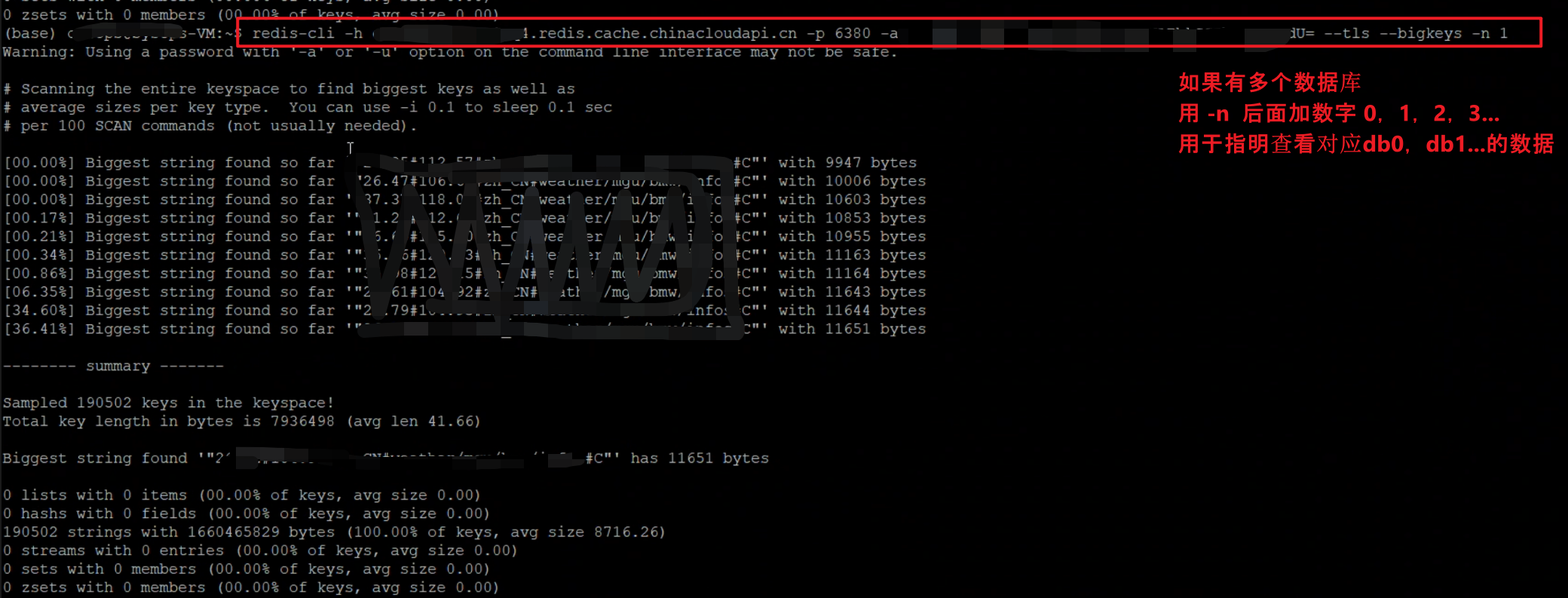
避免出现客户端连接高峰 : 可以查看Redis Metrics中的连接数
内存压力 : 通过查看Redis Metrics中的内存使用量
避免长时间运行的命令 : 通过Azure Redis门户上的console或者是Redis-cli.exe 来执行 slowlog get 100指令
本文就重点演示在Azure Redis门户上的console页面执行 slowlog get 100 指令。
问题回答
因为Redis 服务器是单线程系统。 长时间运行的命令(官名:慢指令, Slowlog)可能导致客户端出现延迟或超时,因为服务器在忙于处理长时间运行的命令时无法响应任何其他请求。那么,如何来查看慢指令呢?
第一步: 登录Azure门户,选择需要查看的Redis服务,进入Console页面
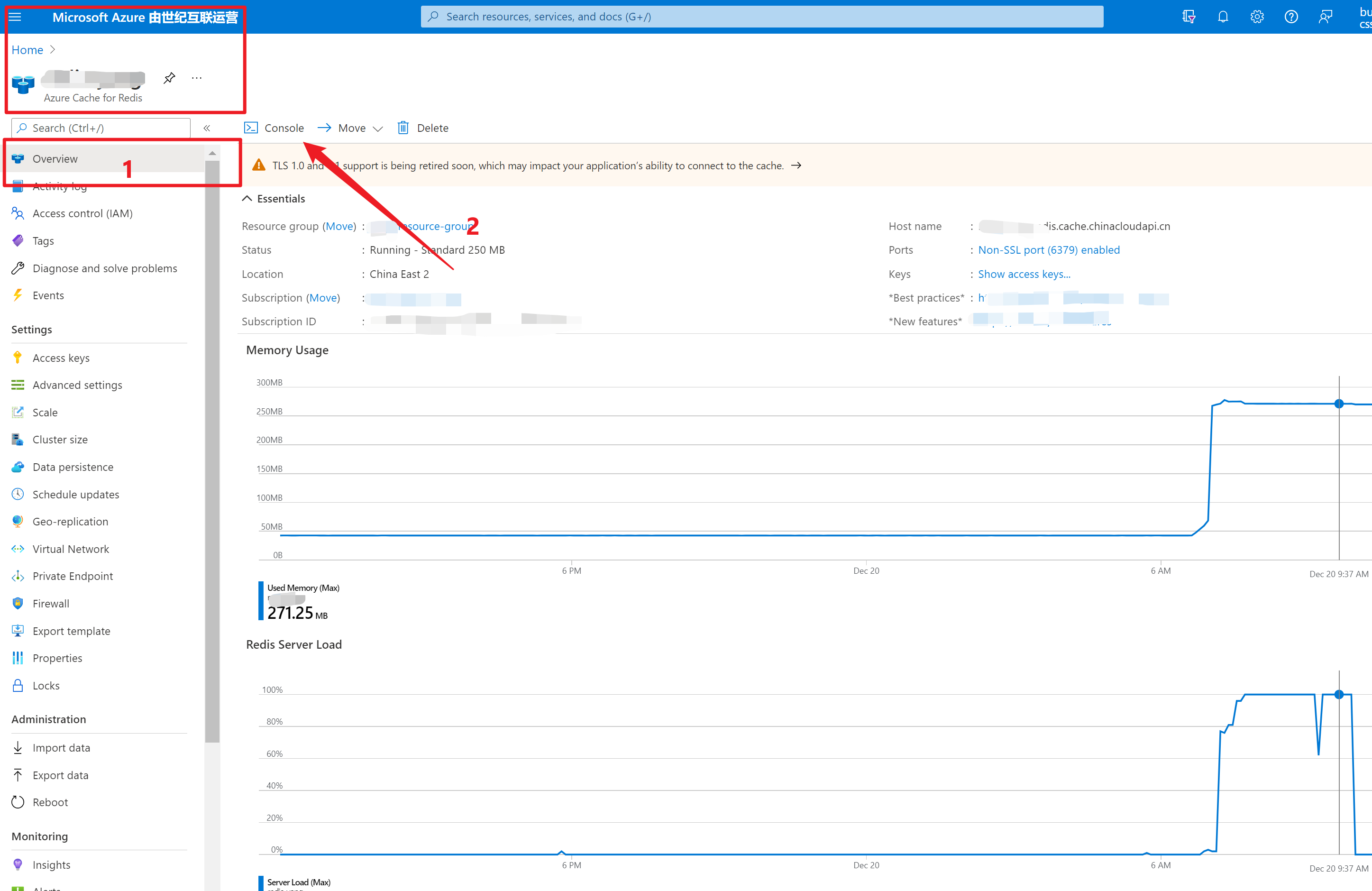
第二步:在Console命令页输入:slowlog get 100
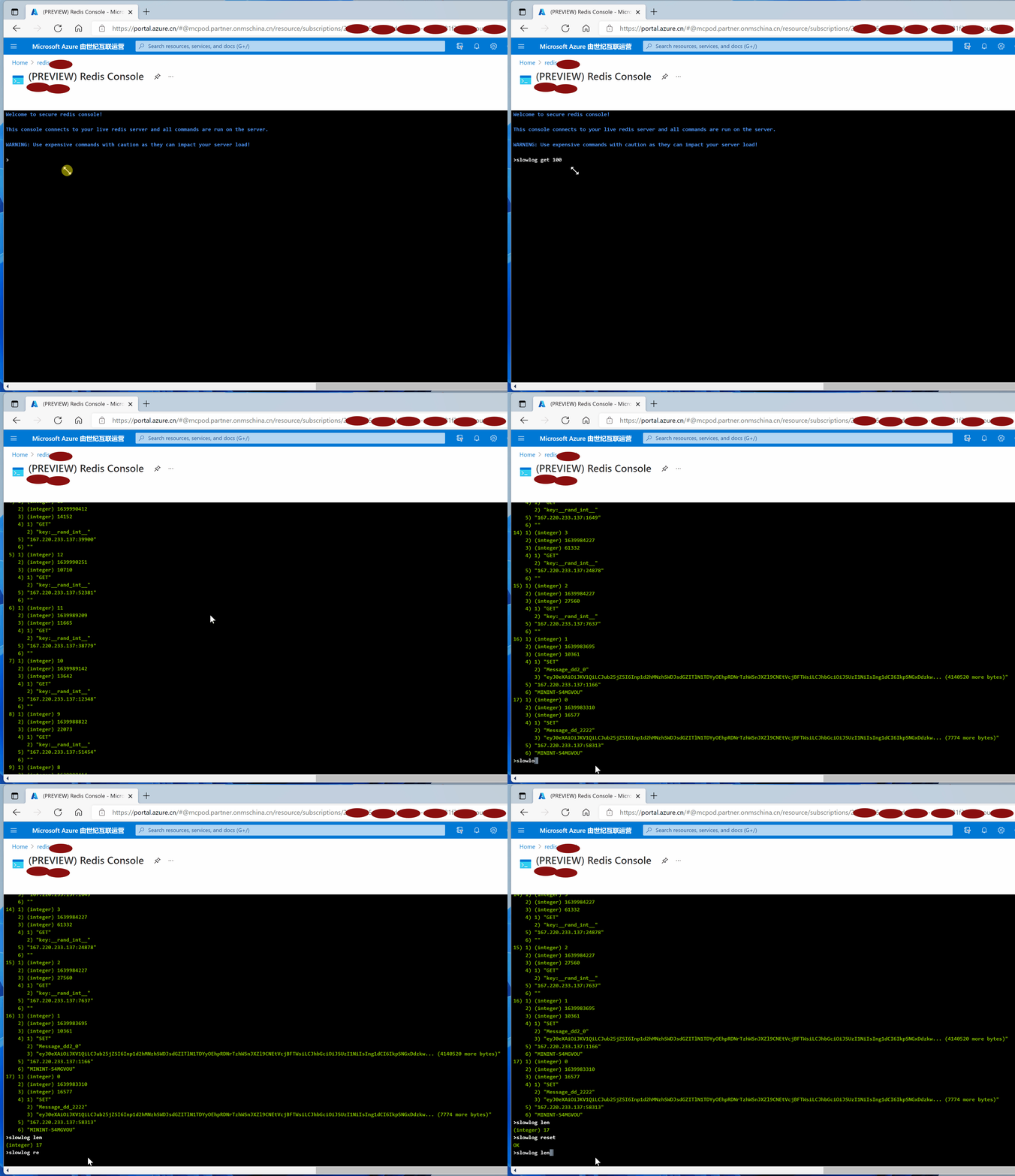
slowlog get 100: 获取当前Redis服务中所记录的慢指令信息,每一个指令包含六部分内容,id,unix时间,指令执行时间(ms 微秒), 指令内容,客户端IP:端口,客户端机器名。
**slowlog len **: 返回当前Redis服务器中所记录的慢指令日志中所记录指令数
**slowlog reset ** :清空当前慢指令记录
指令输出示例:
Welcome to secure redis console!

This console connects to your live redis server and all commands are run on the server.

WARNING: Use expensive commands with caution as they can impact your server load!

>slowlog get 100
 1) 1) (integer) 16
    2) (integer) 1639993957
    3) (integer) 10012
    4) 1) "GET"
       2) "key:__rand_int__"
    5) "167.220.233.137:14835"
    6) ""
 2) 1) (integer) 15
    2) (integer) 1639993727
    3) (integer) 10195
    4) 1) "GET"
       2) "key:__rand_int__"
    5) "167.220.233.137:19468"
    6) ""
 3) 1) (integer) 14
    2) (integer) 1639992068
    3) (integer) 13279
    4) 1) "GET"
       2) "key:__rand_int__"
    5) "167.220.233.137:46504"
    6) ""
 4) 1) (integer) 13
    2) (integer) 1639990412
    3) (integer) 14152
    4) 1) "GET"
       2) "key:__rand_int__"
    5) "167.220.233.137:39900"
    6) ""
 5) 1) (integer) 12
    2) (integer) 1639990251
    3) (integer) 10710
    4) 1) "GET"
       2) "key:__rand_int__"
    5) "167.220.233.137:52381"
    6) ""
 6) 1) (integer) 11
    2) (integer) 1639989209
    3) (integer) 11665
    4) 1) "GET"
       2) "key:__rand_int__"
    5) "167.220.233.137:38779"
    6) ""
 7) 1) (integer) 10
    2) (integer) 1639989142
    3) (integer) 13642
    4) 1) "GET"
       2) "key:__rand_int__"
    5) "167.220.233.137:12348"
    6) ""
 8) 1) (integer) 9
    2) (integer) 1639988822
    3) (integer) 22073
    4) 1) "GET"
       2) "key:__rand_int__"
    5) "167.220.233.137:51454"
    6) ""
 9) 1) (integer) 8
    2) (integer) 1639988414
    3) (integer) 13668
    4) 1) "GET"
       2) "key:__rand_int__"
    5) "167.220.233.137:1550"
    6) ""
10) 1) (integer) 7
    2) (integer) 1639987239
    3) (integer) 18846
    4) 1) "GET"
       2) "key:__rand_int__"
    5) "167.220.233.137:57350"
    6) ""
11) 1) (integer) 6
    2) (integer) 1639986196
    3) (integer) 12921
    4) 1) "GET"
       2) "key:__rand_int__"
    5) "167.220.233.137:1739"
    6) ""
12) 1) (integer) 5
    2) (integer) 1639986196
    3) (integer) 15833
    4) 1) "GET"
       2) "key:__rand_int__"
    5) "167.220.233.137:1739"
    6) ""
13) 1) (integer) 4
    2) (integer) 1639985175
    3) (integer) 14434
    4) 1) "GET"
       2) "key:__rand_int__"
    5) "167.220.233.137:1649"
    6) ""
14) 1) (integer) 3
    2) (integer) 1639984227
    3) (integer) 61332
    4) 1) "GET"
       2) "key:__rand_int__"
    5) "167.220.233.137:24878"
    6) ""
15) 1) (integer) 2
    2) (integer) 1639984227
    3) (integer) 27560
    4) 1) "GET"
       2) "key:__rand_int__"
    5) "167.220.233.137:7637"
    6) ""
16) 1) (integer) 1
    2) (integer) 1639983695
    3) (integer) 10361
    4) 1) "SET"
       2) "Message_dd2_0"
       3) "eyJ0eXAiOiJKV1QiLCJub25jZSI6Inp1d2hMNzhSWDJsdGZITlN1TDYyOEhpRDNrTzhWSnJXZl9CNEtVcjBFTWsiLCJhbGciOiJSUzI1NiIsIng1dCI6IkpSNGxDdzkw... (4140520 more bytes)"
    5) "167.220.233.137:1166"
    6) "MININT-S4MGVOU"
17) 1) (integer) 0
    2) (integer) 1639983310
    3) (integer) 16577
    4) 1) "SET"
       2) "Message_dd_2222"
       3) "eyJ0eXAiOiJKV1QiLCJub25jZSI6Inp1d2hMNzhSWDJsdGZITlN1TDYyOEhpRDNrTzhWSnJXZl9CNEtVcjBFTWsiLCJhbGciOiJSUzI1NiIsIng1dCI6IkpSNGxDdzkw... (7774 more bytes)"
    5) "167.220.233.137:58313"
    6) "MININT-S4MGVOU"
>slowlog len
(integer) 17
>slowlog reset
OK
>slowlog len
(integer) 0
Each entry from the slow log is comprised of the following six values:
A unique progressive identifier for every slow log entry.
The unix timestamp at which the logged command was processed.
The amount of time needed for its execution, in microseconds.
The array composing the arguments of the command.
Client IP address and port.
Client name if set via the CLIENT SETNAME command.
参考资料
SLOWLOG GET ****[count]:https://redis.io/commands/slowlog-get
管理 Azure Cache for Redis 的服务器负载: https://docs.azure.cn/zh-cn/azure-cache-for-redis/cache-best-practices-server-load#value-sizes
正在加载评论...