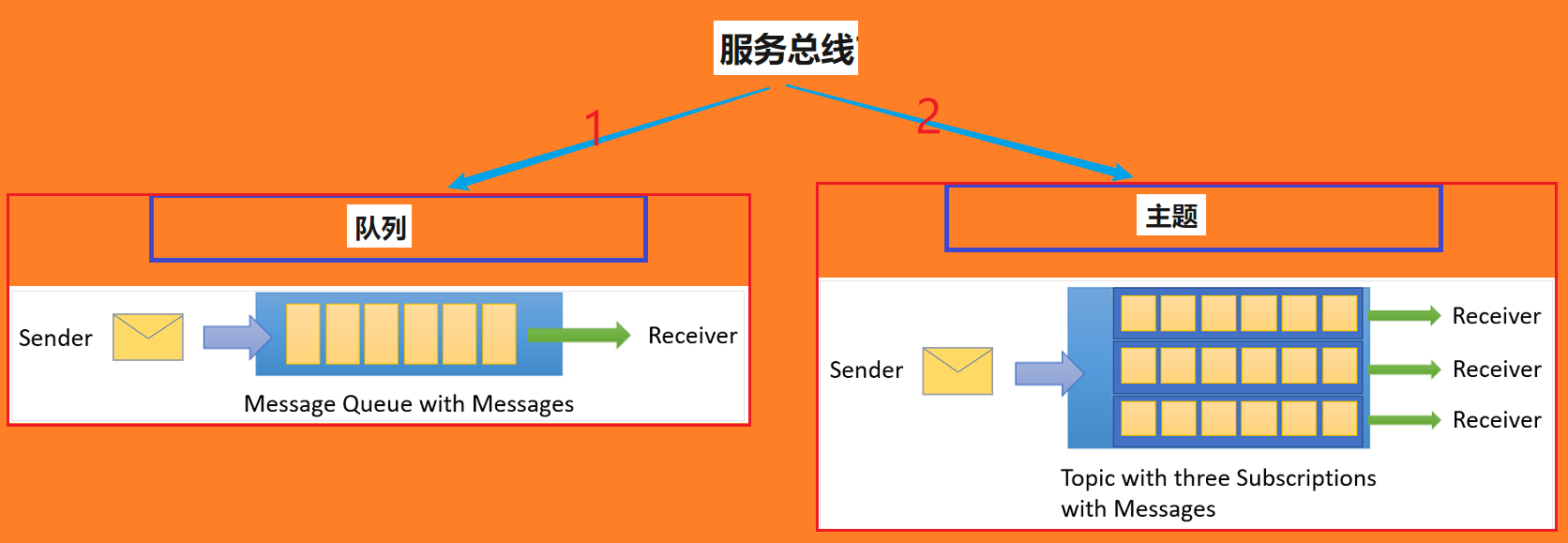
(Azure Service Bus服务总线的两大类消息处理方式: 队列Queue和主题Topic)
问题描述
使用Service Bus作为企业消息代理,当有大量的数据堆积再Queue或Topic中时,如何来优化接收端处理消息的能力呢?
详细解释
在接收端(Receover)的代码中,有两个属性与处理消息的能力有关。一是maxConcurrentCalls(最大并发处理数), 二是prefetchCount (预提取消息数)。 在Service Bus的SDK(azure-messaging-servicebus:7.0.0.0)中,他们的描述如下:
| maxConcurrentCalls | 接收端所定义的ServiceBusProcessorClient处理的最大并发消息数。 The max concurrent messages that should be processed by the processor. | package com.azure.messaging.servicebus.implementation.models; ... ... public final class ServiceBusProcessorClientOptions { ... ... /** * The max concurrent messages that should be processed by the processor. * @return The max concurrent message that should be processed by the processor. */ public int getMaxConcurrentCalls() { return maxConcurrentCalls; } |
|---|---|---|
| prefetchCount | 接收端要预先提取的消息数 The number of messages to prefetch | package com.azure.messaging.servicebus; ... ... public final class ServiceBusClientBuilder { ... ... // Using 0 pre-fetch count for both receive modes, to avoid message lock lost exceptions in application // receiving messages at a slow rate. Applications can set it to a higher value if they need better performance. private static final int DEFAULT_PREFETCH_COUNT = 1; |
在初始化ServiceBusProcessorClient对象时,可以设置maxConcurrentCalls和prefetchCount的值。如
// Create an instance of the processor through the ServiceBusClientBuilder
ServiceBusProcessorClient processorClient = new ServiceBusClientBuilder().processError(errorHandler).maxConcurrentCalls(5).prefetchCount(10).buildProcessorClient();
实验验证
在本次的实验中,**如何来验证maxConcurrentCalls值启作用了呢?如何判断prefetchCount是否获取了消息呢? **
针对maxConcurrentCalls,可以在处理消息的代码中[processMessage(messageProcessor)]打印出当前线程的ID[Thread.currentThread().getId()]。
针对prefetchCount,可以从侧面来验证,即获取message的DeliveryCount来判断已经预提取了多少次
本次实验的代码参考Azure Service Bus的快速入门文档所编写,文末包含全部的代码和POM.XML文件。* *
**首先在代码中设置concall和prefetch值。**默认情况下为1.本次实验也从1开始,在设定的10秒钟之内查看消费消息的数量。
        int concall=1;
        int prefetch =1;
        // Create an instance of the processor through the ServiceBusClientBuilder
        ServiceBusProcessorClient processorClient = new ServiceBusClientBuilder().connectionString(connectionString)
                .processor().topicName(topicName).subscriptionName(subName).processMessage(messageProcessor)
                .processError(errorHandler).maxConcurrentCalls(concall).prefetchCount(prefetch).buildProcessorClient();
                System.out.println("Starting the processor");
        System.out.println("Set Processor: maxConcurrentCalls = "+concall+", prefetchCount = "+prefetch);

        processorClient.start();
然后再处理消息的对象中,打印出当前处理消息的次序,消息ID,Delivery次数,处理消息的线程ID。
        Consumer<ServiceBusReceivedMessageContext> messageProcessor = context -> {
            ServiceBusReceivedMessage message = context.getMessage();

            ordernumber++;

            System.out.println(ordernumber + " Message ID:" + message.getMessageId() + ",Current Delivery Count:"
                    + message.getDeliveryCount() + ",Current Thread ID:" + Thread.currentThread().getId());
        };
第一次实验:处理消息的线程号只有一个:21, 在10秒时间中处理23条消息
| Hello World! SLF4J: Failed to load class "org.slf4j.impl.StaticLoggerBinder". SLF4J: Defaulting to no-operation (NOP) logger implementation SLF4J: See http://www.slf4j.org/codes.html#StaticLoggerBinder for further details. Starting the processor Set Processor: maxConcurrentCalls = 1, prefetchCount = 1 1 Message ID:7caf842c-b98e-4bb5-88e6-bbacc8c45044,Current Delivery Count:1,Current Thread ID:21 2 Message ID:0589aa12-9787-46dd-ba80-412cb125abee,Current Delivery Count:1,Current Thread ID:21 3 Message ID:86d891cf-f3fc-42d9-88ba-bb90bf410f53,Current Delivery Count:1,Current Thread ID:21 4 Message ID:df22f493-968d-4ab6-a8f8-73758d365079,Current Delivery Count:1,Current Thread ID:21 ... ... 23 Message ID:4422744a-1fb3-4a5c-a0e8-7b598624de56,Current Delivery Count:1,Current Thread ID:21 Total Process Message Count = 23 in 10 seconds. Stopping and closing the processor Done World! |
|---|
第二次实验:处理消息的线程号有5个:21,21,23,24,25, 在10秒时间中处理42条消息
| Hello World! SLF4J: Failed to load class "org.slf4j.impl.StaticLoggerBinder". SLF4J: Defaulting to no-operation (NOP) logger implementation SLF4J: See http://www.slf4j.org/codes.html#StaticLoggerBinder for further details. Starting the processor Set Processor: maxConcurrentCalls = 5, prefetchCount = 10 1 Message ID:71333a8b-82a6-48a6-b313-dd5daf155878,Current Delivery Count:0,Current Thread ID:21 2 Message ID:7349bd87-d52e-462e-b549-0069845a89ae,Current Delivery Count:0,Current Thread ID:22 3 Message ID:6b1ae777-b798-42f1-b9c8-85fe09be2f06,Current Delivery Count:0,Current Thread ID:23 4 Message ID:9fb1a641-a9b2-49b6-a352-da8d7ed77894,Current Delivery Count:0,Current Thread ID:24 5 Message ID:7e27a824-577d-4407-8ec2-2813b426ee49,Current Delivery Count:0,Current Thread ID:25 6 Message ID:24fd3b47-1619-4570-9ccb-55731f5c94a3,Current Delivery Count:0,Current Thread ID:21 ... ... 39 Message ID:5b5a6b32-a9aa-493c-ad3d-c88dc8a15ae4,Current Delivery Count:0,Current Thread ID:24 40 Message ID:1510b7fe-744e-4647-a373-4434e1e1b470,Current Delivery Count:0,Current Thread ID:25 41 Message ID:9a64f921-015d-4372-b1e9-3475c4570597,Current Delivery Count:0,Current Thread ID:21 42 Message ID:b744cc37-f3a4-41ed-9582-2bfdf4dc759c,Current Delivery Count:0,Current Thread ID:22 Total Process Message Count = 42 in 10 seconds. Stopping and closing the processor Done World! |
|---|
第三次实验:处理消息的线程号有10个:21,21 ... 30, 在10秒时间中处理46条消息
| Hello World! SLF4J: Failed to load class "org.slf4j.impl.StaticLoggerBinder". SLF4J: Defaulting to no-operation (NOP) logger implementation SLF4J: See http://www.slf4j.org/codes.html#StaticLoggerBinder for further details. Starting the processor Set Processor: maxConcurrentCalls = 10, prefetchCount = 30 1 Message ID:a07fe5a5-047d-4d25-ad1e-c199ef13b249,Current Delivery Count:1,Current Thread ID:21 2 Message ID:d8a45441-d365-4c71-8483-3b1e2714b1bd,Current Delivery Count:1,Current Thread ID:22 3 Message ID:819512bd-6b45-48dd-8ccf-4f81dc45423a,Current Delivery Count:1,Current Thread ID:23 4 Message ID:0390edb1-6f72-41b5-a81a-b1ff08b257b4,Current Delivery Count:1,Current Thread ID:24 5 Message ID:f36cd0ff-84b4-4bd5-938b-83ba94f857f1,Current Delivery Count:1,Current Thread ID:25 6 Message ID:a9155e92-d1a6-4f42-876d-3b18222c9e09,Current Delivery Count:1,Current Thread ID:26 7 Message ID:d0d6d5b8-8ec1-40f2-aee9-c2273ea8dc0a,Current Delivery Count:1,Current Thread ID:27 8 Message ID:c5d9b0c6-bb40-4004-864f-1c5b0f3b66fc,Current Delivery Count:1,Current Thread ID:28 9 Message ID:a0510766-3651-49bb-9b49-fde39ad721dc,Current Delivery Count:1,Current Thread ID:29 10 Message ID:9114cd88-e3ea-4e29-9ba3-45d162d60e14,Current Delivery Count:1,Current Thread ID:30 11 Message ID:d9634704-6808-46b1-959c-fffd77507818,Current Delivery Count:1,Current Thread ID:21 ... ... 42 Message ID:8519277f-7f37-407d-9736-580b144bec81,Current Delivery Count:1,Current Thread ID:22 43 Message ID:e1b67b72-ec44-4f94-84b2-3ced2fcff598,Current Delivery Count:1,Current Thread ID:23 44 Message ID:d369226c-1ebd-4505-bb85-74d458c54f37,Current Delivery Count:1,Current Thread ID:24 45 Message ID:66a45a5b-22f9-4758-b793-ae92841faedb,Current Delivery Count:1,Current Thread ID:25 46 Message ID:8f027132-6b66-41fe-ad14-d6e7c437fb38,Current Delivery Count:1,Current Thread ID:26 Total Process Message Count = 46 in 10 seconds. Stopping and closing the processor Done World! |
|---|
三次测试的结论
在测试中,由于测试的时长只有10秒,所以无法得出一个合理的maxConcurrentCalls和prefetchCount值。至少maxCouncurrentCalls的值能大幅度提升接收端(Receiver)处理消息的能力。
在第三次的的测试中,我们发现Delivery Count的计数变为了1,这是因为在第二次测试中,我们设置的预提取数量为10,每次提取的数量大于了接收端能处理的数量。在10秒钟的测试中,并没有完全处理完所有提取出来的消息,以致于在第三次测试中,这些消息的Delivery次数从0变成了1。
优化建议
预提取可加快消息流程,方法是在应用程序请求消息时及请求消息前,准备好消息用于本地检索。
- 通过 ReceiveAndDelete 接收模式,预提取缓存区获取的所有消息在队列中不再可用,仅保留在内存中预提取缓存区,直到应用程序通过 Receive/ReceiveAsync 或 OnMessage/OnMessageAsync API 接收到它们 。 如果在应用程序接收到消息前终止应用程序,这些消息将丢失,且不可恢复。
- 在 PeekLock 接收模式下,提取到预提取缓存区的消息将以锁定状态进入缓存区,并且将超时时钟用于锁定计时。 如果预提取缓存区很大,且处理所需时间过长,以致消息锁定在驻留于预提取缓存区,甚至应用程序还在处理消息时就到期,可能出现一些令人困惑的事件要应用程序处理。
如果消息处理需要高度的可靠性,且处理需要大量精力和时间,则建议谨慎使用或者丝毫不用预提取功能。
如果需要较高吞吐量且消息处理通常比较便宜,则预提取会产生显著的吞吐量优势。
需要均衡对队列或订阅配置的最大预提取数和锁定持续时间,以便锁定超时至少超出最大预提取缓存区大小外加一条消息的累积预期消息处理时间。 同时,锁定超时不应过长,防止消息在被意外丢弃后超出其最大 TimeToLive,因此需要消息的锁定在重新传送消息前到期。
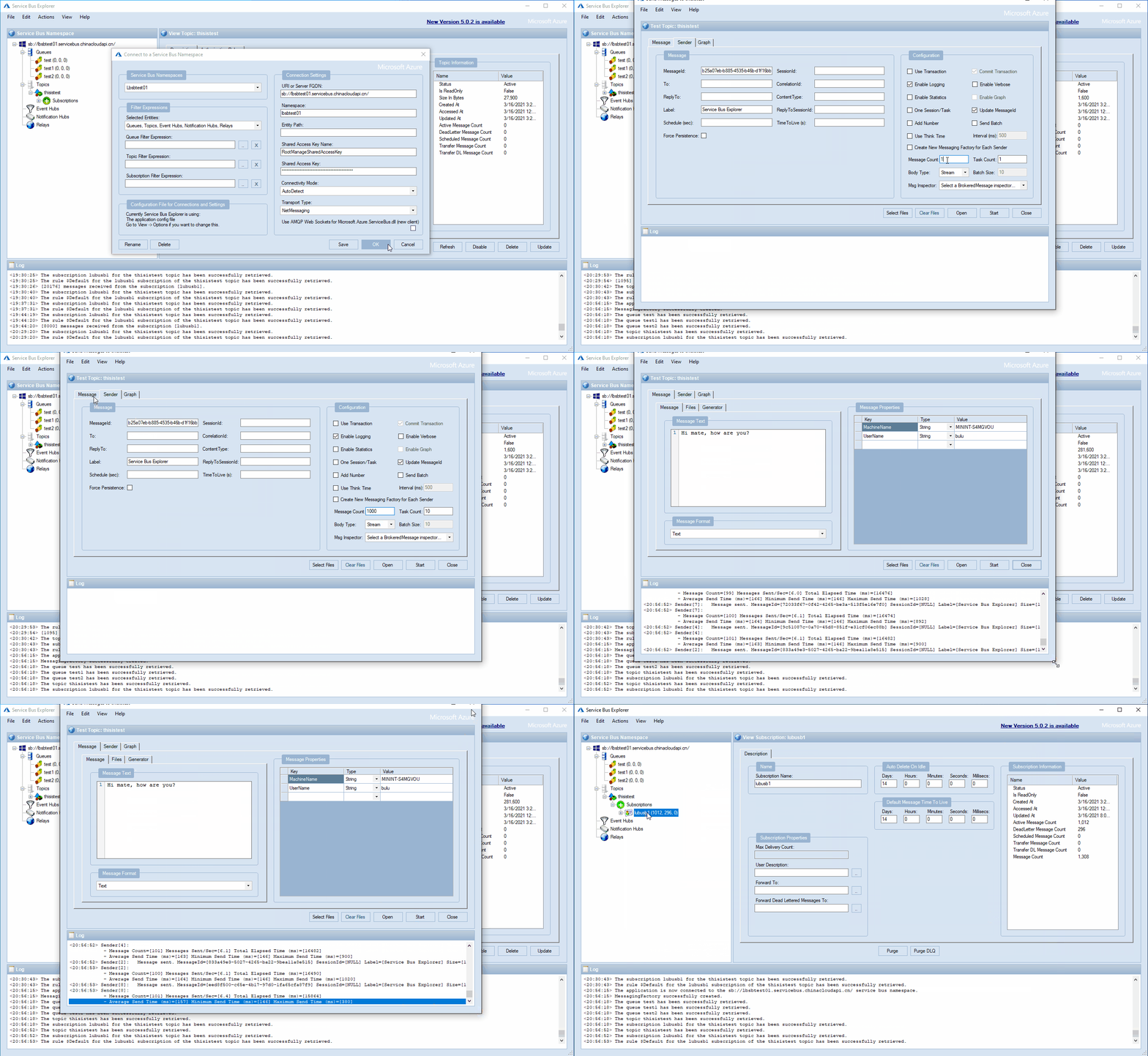
附录一:使用Service Bus Explorer工具快速生成大量消息
附录二:测试实例pom.xml内容
<?xml version="1.0" encoding="UTF-8"?>

<project xmlns="http://maven.apache.org/POM/4.0.0" xmlns:xsi="http://www.w3.org/2001/XMLSchema-instance"
  xsi:schemaLocation="http://maven.apache.org/POM/4.0.0 http://maven.apache.org/xsd/maven-4.0.0.xsd">
  <modelVersion>4.0.0</modelVersion>

  <groupId>testgroupid</groupId>
  <artifactId>testartifactid</artifactId>
  <version>1.0-SNAPSHOT</version>

  <name>testartifactid</name>
  <!-- FIXME change it to the project's website -->
  <url>http://www.example.com</url>

  <properties>
    <project.build.sourceEncoding>UTF-8</project.build.sourceEncoding>
    <maven.compiler.source>1.8</maven.compiler.source>
    <maven.compiler.target>1.8</maven.compiler.target>
  </properties>

  <dependencies>
    <dependency>
      <groupId>junit</groupId>
      <artifactId>junit</artifactId>
      <version>4.11</version>
      <scope>test</scope>
    </dependency>
    <dependency>
      <groupId>com.azure</groupId>
      <artifactId>azure-messaging-servicebus</artifactId>
      <version>7.0.0</version>
  </dependency>

    <dependency>
      <groupId>com.azure</groupId>
      <artifactId>azure-messaging-servicebus</artifactId>
      <version>7.0.0-beta.7</version>
    </dependency>
  </dependencies>

  <build>
    <pluginManagement><!-- lock down plugins versions to avoid using Maven defaults (may be moved to parent pom) -->
      <plugins>
        <!-- clean lifecycle, see https://maven.apache.org/ref/current/maven-core/lifecycles.html#clean_Lifecycle -->
        <plugin>
          <artifactId>maven-clean-plugin</artifactId>
          <version>3.1.0</version>
        </plugin>
        <!-- default lifecycle, jar packaging: see https://maven.apache.org/ref/current/maven-core/default-bindings.html#Plugin_bindings_for_jar_packaging -->
        <plugin>
          <artifactId>maven-resources-plugin</artifactId>
          <version>3.0.2</version>
        </plugin>
        <plugin>
          <artifactId>maven-compiler-plugin</artifactId>
          <version>3.8.0</version>
        </plugin>
        <plugin>
          <artifactId>maven-surefire-plugin</artifactId>
          <version>2.22.1</version>
        </plugin>
        <plugin>
          <artifactId>maven-jar-plugin</artifactId>
          <version>3.0.2</version>
        </plugin>
        <plugin>
          <artifactId>maven-install-plugin</artifactId>
          <version>2.5.2</version>
        </plugin>
        <plugin>
          <artifactId>maven-deploy-plugin</artifactId>
          <version>2.8.2</version>
        </plugin>
        <!-- site lifecycle, see https://maven.apache.org/ref/current/maven-core/lifecycles.html#site_Lifecycle -->
        <plugin>
          <artifactId>maven-site-plugin</artifactId>
          <version>3.7.1</version>
        </plugin>
        <plugin>
          <artifactId>maven-project-info-reports-plugin</artifactId>
          <version>3.0.0</version>
        </plugin>
      </plugins>
    </pluginManagement>
  </build>
</project>
附录三:App.java代码
package com.servicebus.test;

import com.azure.messaging.servicebus.*;
import com.azure.messaging.servicebus.models.*;
import java.util.concurrent.TimeUnit;
import java.util.function.Consumer;
import java.sql.Date;
import java.util.Arrays;
import java.util.List;

/**
 * Hello world!
 *
 */
public class App {

    static String connectionString = "Endpoint=sb://xxxxxxxx.servicebus.chinacloudapi.cn/;SharedAccessKeyName=RootManageSharedAccessKey;SharedAccessKey=xxxxxxxxxxxxxxxxxxxxxxxxxxxxx";
    static String topicName = "thisistest";
    static String subName = "lubusb1";

    static int ordernumber = 0;

    public static void main(String[] args) throws InterruptedException {
        System.out.println("Hello World!");

        // sendMessage();
        // sendMessageBatch();

        receiveMessages();

        System.out.println("Done World!");
    }

    // handles received messages
    static void receiveMessages() throws InterruptedException {
        // Consumer that processes a single message received from Service Bus
        Consumer<ServiceBusReceivedMessageContext> messageProcessor = context -> {
            ServiceBusReceivedMessage message = context.getMessage();

            ordernumber++;

            System.out.println(ordernumber + " Message ID:" + message.getMessageId() + ",Current Delivery Count:"
                    + message.getDeliveryCount() + ",Current Thread ID:" + Thread.currentThread().getId());
        };

        // Consumer that handles any errors that occur when receiving messages
        Consumer<Throwable> errorHandler = throwable -> {
            System.out.println("Error when receiving messages: " + throwable.getMessage());
            if (throwable instanceof ServiceBusReceiverException) {
                ServiceBusReceiverException serviceBusReceiverException = (ServiceBusReceiverException) throwable;
                System.out.println("Error source: " + serviceBusReceiverException.getErrorSource());
            }
        };

        int concall=10;
        int prefetch =30;
        // Create an instance of the processor through the ServiceBusClientBuilder
        ServiceBusProcessorClient processorClient = new ServiceBusClientBuilder().connectionString(connectionString)
                .processor().topicName(topicName).subscriptionName(subName).processMessage(messageProcessor)
                .processError(errorHandler).maxConcurrentCalls(concall).prefetchCount(prefetch).buildProcessorClient();
                System.out.println("Starting the processor");
        System.out.println("Set Processor: maxConcurrentCalls = "+concall+", prefetchCount = "+prefetch);

        processorClient.start();


        TimeUnit.SECONDS.sleep(10);
        System.out.println("Total Process Message Count = "+ordernumber+" in 10 seconds.");
        System.out.println("Stopping and closing the processor");
        processorClient.close();
    }

    static void sendMessage() {
        // create a Service Bus Sender client for the queue
        ServiceBusSenderClient senderClient = new ServiceBusClientBuilder().connectionString(connectionString).sender()
                .topicName(topicName).buildClient();

        // send one message to the topic
        senderClient.sendMessage(new ServiceBusMessage("Hello, World!"));
        System.out.println("Sent a single message to the topic: " + topicName);
    }

    static List<ServiceBusMessage> createMessages() {
        // create a list of messages and return it to the caller
        ServiceBusMessage[] messages = { new ServiceBusMessage("First message"),
                new ServiceBusMessage("Second message"), new ServiceBusMessage("Third message") };
        return Arrays.asList(messages);
    }

    static void sendMessageBatch() {
        // create a Service Bus Sender client for the topic
        ServiceBusSenderClient senderClient = new ServiceBusClientBuilder().connectionString(connectionString).sender()
                .topicName(topicName).buildClient();

        // Creates an ServiceBusMessageBatch where the ServiceBus.
        ServiceBusMessageBatch messageBatch = senderClient.createMessageBatch();

        // create a list of messages
        List<ServiceBusMessage> listOfMessages = createMessages();

        // We try to add as many messages as a batch can fit based on the maximum size
        // and send to Service Bus when
        // the batch can hold no more messages. Create a new batch for next set of
        // messages and repeat until all
        // messages are sent.
        for (ServiceBusMessage message : listOfMessages) {
            if (messageBatch.tryAddMessage(message)) {
                continue;
            }

            // The batch is full, so we create a new batch and send the batch.
            senderClient.sendMessages(messageBatch);
            System.out.println("Sent a batch of messages to the topic: " + topicName);

            // create a new batch
            messageBatch = senderClient.createMessageBatch();

            // Add that message that we couldn't before.
            if (!messageBatch.tryAddMessage(message)) {
                System.err.printf("Message is too large for an empty batch. Skipping. Max size: %s.",
                        messageBatch.getMaxSizeInBytes());
            }
        }

        if (messageBatch.getCount() > 0) {
            senderClient.sendMessages(messageBatch);
            System.out.println("Sent a batch of messages to the topic: " + topicName);
        }

        // close the client
        senderClient.close();
    }
}
参考资料
Service Bus Explorer:https://github.com/paolosalvatori/ServiceBusExplorer
预提取 Azure 服务总线消息:https://docs.azure.cn/zh-cn/service-bus-messaging/service-bus-prefetch#if-it-is-faster-why-is-prefetch-not-the-default-option
向 Azure 服务总线队列发送消息并从中接收消息 (Java):https://docs.azure.cn/zh-cn/service-bus-messaging/service-bus-java-how-to-use-queues
正在加载评论...