问题描述
正常情况下,如果需要为应用服务安装SSL证书,可以在证书准备好的情况,通过门户上传即可,详细步骤可以参考微软官方文档(在 Azure 应用服务中添加 TLS/SSL 证书:https://docs.azure.cn/zh-cn/app-service/configure-ssl-certificate), 但是由于Global Azure和中国区Azure的不同之处,在中国区微软云无法直接在门户中导入Key Vault中的证书。 以下是两个版本页面之间的不同之处:
| 中国区 Azure | 国际版 Azure |
|---|---|
那要这样才能在中国区中导入Key Vault中的SSL证书呢? 使用PowerShell脚本完成导入完成。(把KeyVaule中的证书转变为Secrets后,配置到App Service)
执行步骤
1) 在Key Vault中把证书已PFX/PEM格式导出(其实导出证书后,可以直接在App Service中上传证书,只是这样就没有Key Vault来保护证书)
(导航路径: Key Vault --> Settings Certificates --> Certificates Name --> Current Version)
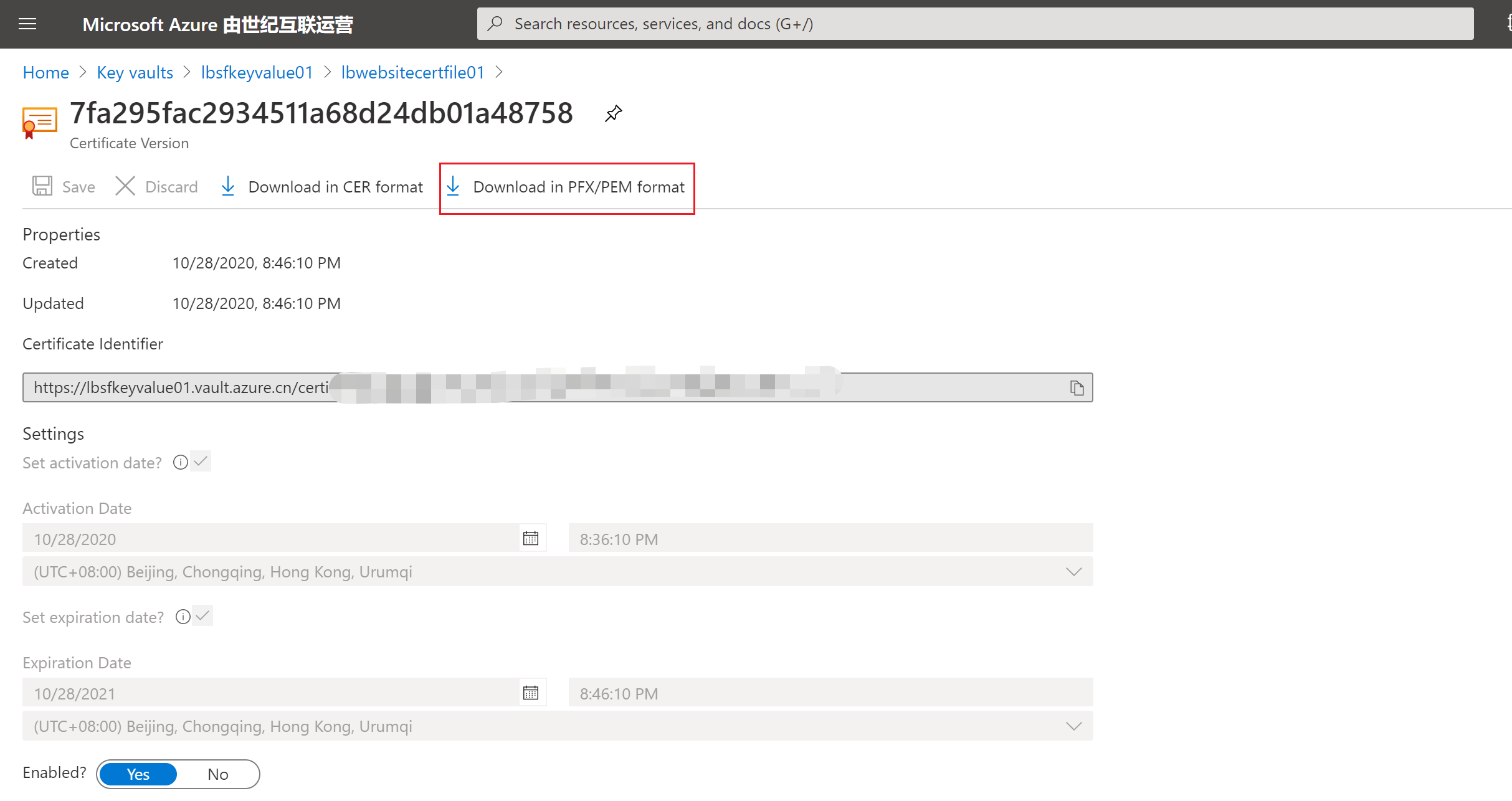
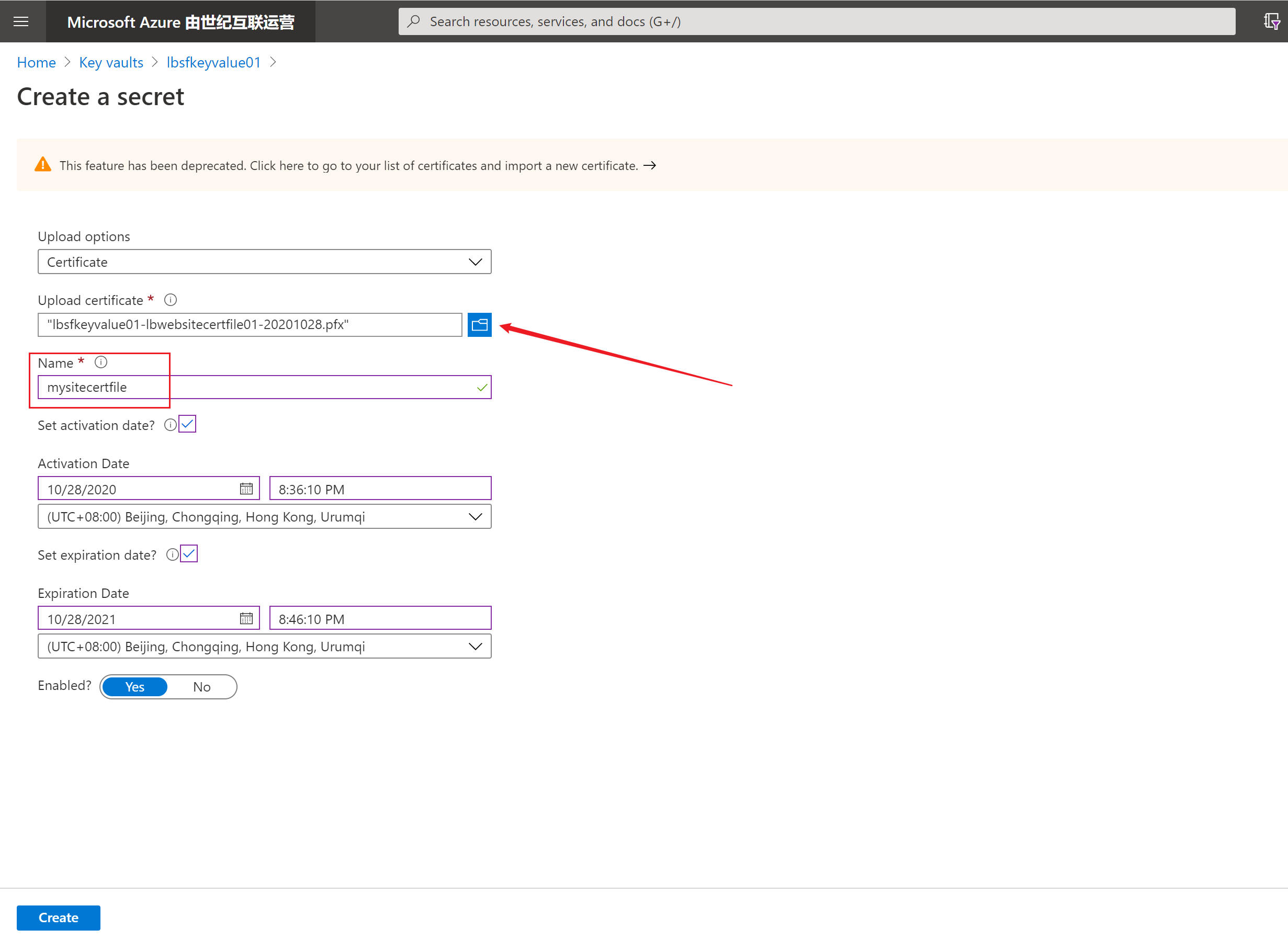
2) 把证书导入到Key Vault中的Secrets中。自定义一个Key Vault Secret Name并复制出key vault的资源ID,第三步会使用到。
选择Upload Options为Certificate
上传第一步中下载的证书
输入证书名:mysitecertfile(第三步 Powershell命令中需要)
3)修改指定的参数,运行PowerShell命令,把证书导入到App Service中
Connect-AzureRmAccount -Environment AzureChinaCloud

$location = "<resource location>"
$ResourceGroupName = "<app service resource group name>"
$AppServicePlanName = "/subscriptions/<subscription id>/resourceGroups/<app service resource group name>/providers/Microsoft.Web/serverfarms/<server farm id>"
$KeyVault = "/subscriptions/<subscription id>/resourcegroups/<key vault resource group name>/providers/microsoft.keyvault/vaults/<key vault name>"
$KeyVaultSecert = "<key vault secret name>"

$newCert = "NewCertificate"

$PropertiesObject = @{
keyVaultId= $KeyVault
keyVaultSecretName= $KeyVaultSecert
serverFarmId= $AppServicePlanName
}

New-AzureRmResource -Name $newCert -Location $location `
                    -PropertyObject $PropertiesObject `
                    -ResourceGroupName $ResourceGroupName `
                    -ResourceType Microsoft.Web/certificates `
                    -Force
以上值都可以在相对应的资源中查看:
$AppServicePlanName:在应用服务的Overview页面中,通过App Service Plan链接进入,在Porperties(左侧目录)页面复制Resource ID值
$KeyVault:在Key Vault的Overview页面中,点击Porperties(左侧目录)页面复制Resource ID值
如果登录后,有多个订阅信息,可以通过命令Select-AzureRmSubscription -Subscription '<your subscription name>' 来指定订阅
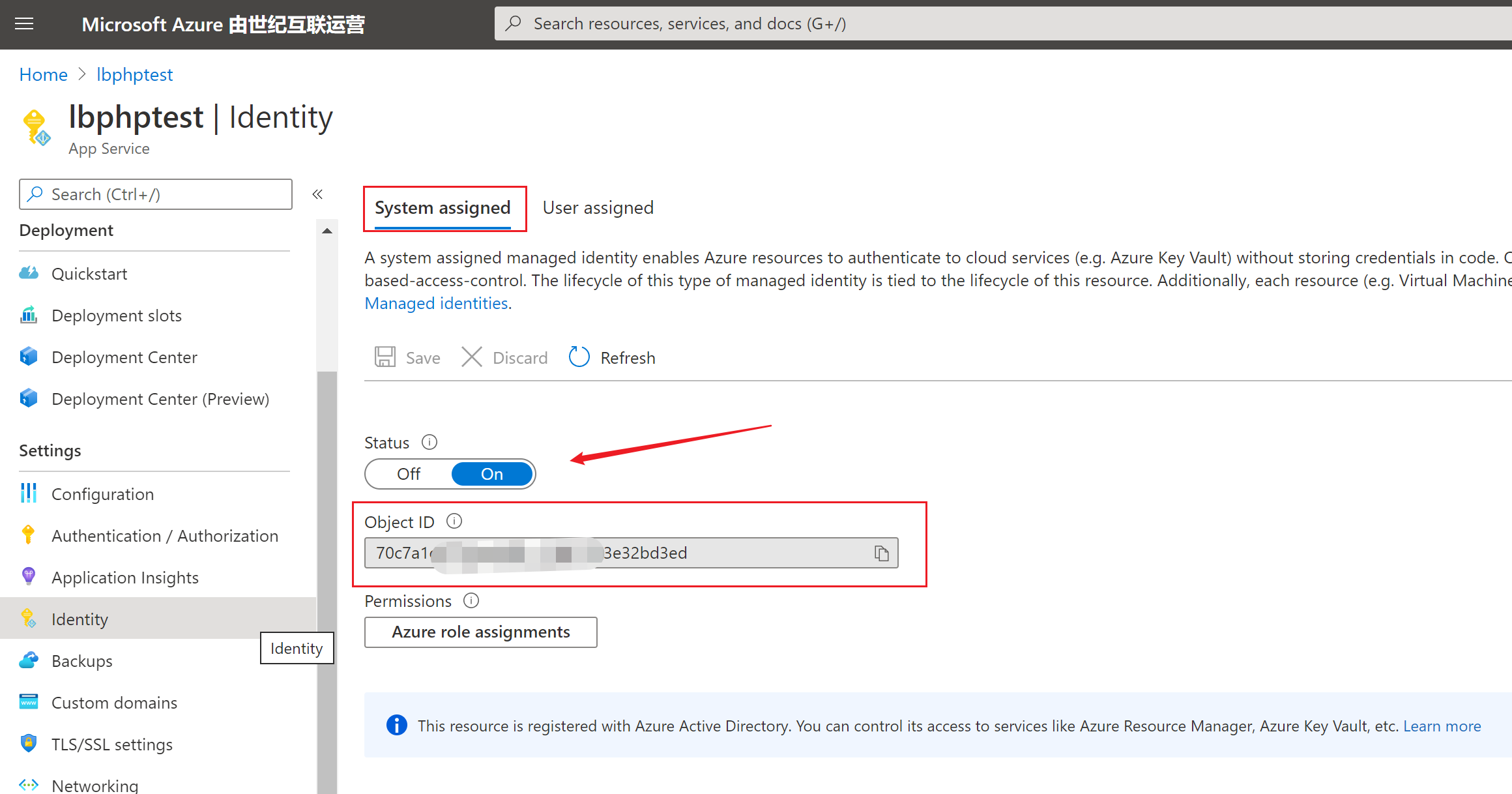
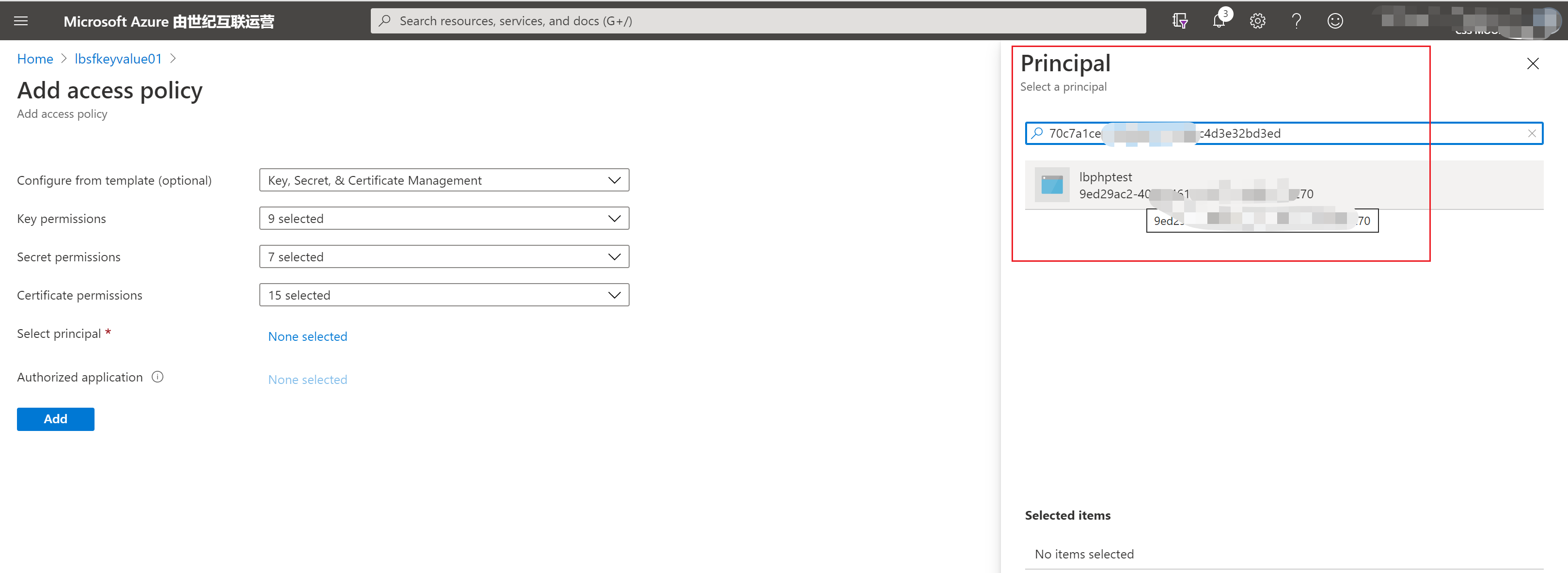
在执行绑定Key Vault证书时,如果遇见"The service does not have access to '/subscriptions/............/microsoft.keyvault/vaults/...' Key Vault.Please make sure that you have granted necessary permissions to the service to perform the request operation. 需要执行以下两个步骤来为App Service复制访问Key Vault的授权
在App Service中开启Identity, System Assigned功能,并复制出Object ID用于在Key Value中赋予权限
- 在Key Vault中的Access Policies中为App Service赋予访问权限
4)访问站点,验证证书。
参考资料
在 Azure 应用服务中添加 TLS/SSL 证书:https://docs.azure.cn/zh-cn/app-service/configure-ssl-certificate
使用应用服务和 Azure Functions 的 Key Vault 引用: https://docs.azure.cn/zh-cn/app-service/app-service-key-vault-references
关于 Azure Key Vault: https://docs.azure.cn/zh-cn/key-vault/general/overview
Azure Key Vault 有助于解决以下问题:
机密管理 - Azure Key Vault 可以用来安全地存储令牌、密码、证书、API 密钥和其他机密,并对其访问进行严格控制
密钥管理 - Azure Key Vault 也可用作密钥管理解决方案。 可以通过 Azure Key Vault 轻松创建和控制用于加密数据的加密密钥。
证书管理 - Azure Key Vault 也是一项服务,可用来轻松预配、管理和部署公用和专用传输层安全性/安全套接字层 (TLS/SSL) 证书,以用于 Azure 以及内部连接资源。
为何使用 Azure Key Vault?
集中管理应用程序机密
在 Azure Key Vault 中集中存储应用程序机密就可以控制其分发。 Key Vault 可以大大减少机密意外泄露的可能性。 有了 Key Vault,应用程序开发人员就再也不需要将安全信息存储在应用程序中。 无需将安全信息存储在应用程序中,因此也无需将此信息作为代码的一部分。 例如,如果某个应用程序需要连接到数据库, 则可将连接字符串安全地存储在 Key Vault 中,而不是存储在应用代码中。
应用程序可以使用 URI 安全访问其所需的信息。 这些 URI 允许应用程序检索特定版本的机密。 这样就不需编写自定义代码来保护存储在 Key Vault 中的任何机密信息。
正在加载评论...