问题描述
在使用Azure Spring Cloud服务时,如果要收集应用程序的日志。有控制台输出(实时流日志),也可以配置Log Analytics服务。
日志流式处理
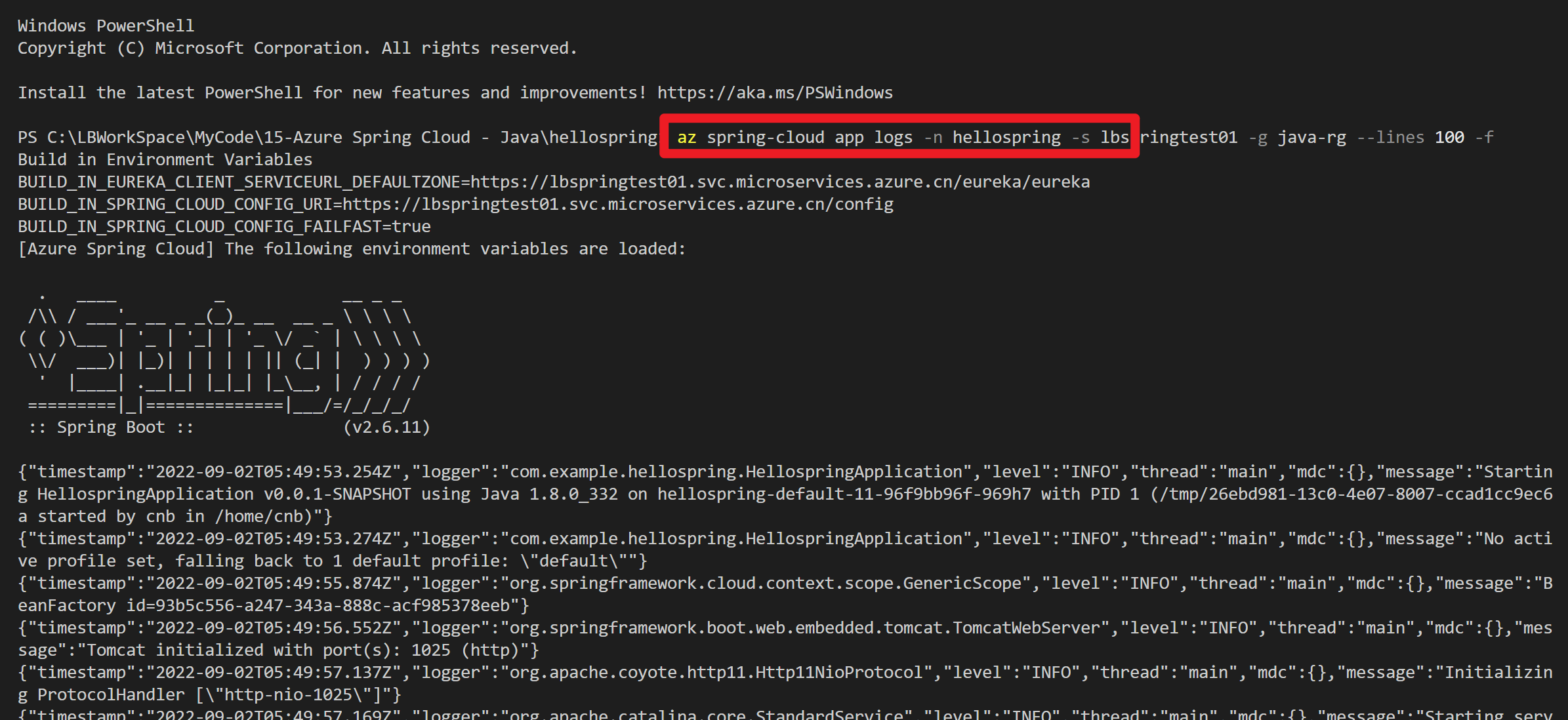
可以通过以下命令在 Azure CLI 中使用日志流式处理。
az spring-cloud app logs -n hellospring -s yourspringcloudname -g <resource group name> --lines 100 -f
Log Analytics
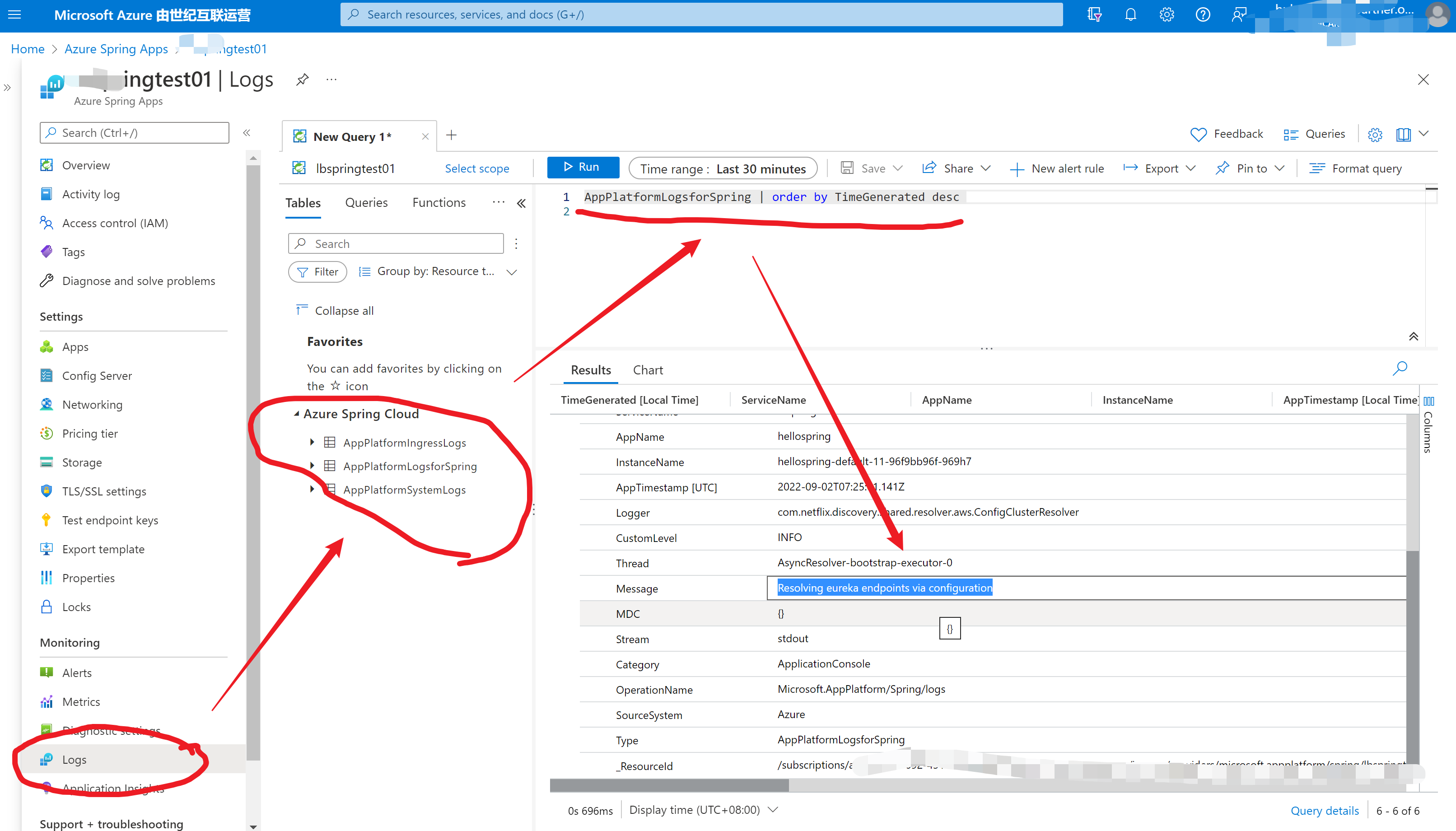
在Azure Spring Cloud门户页面,转到“服务 | 概述”页,然后在“监视”部分中选择“日志” 。 选择 Azure Spring Cloud 的一个示例查询上的“运行”。
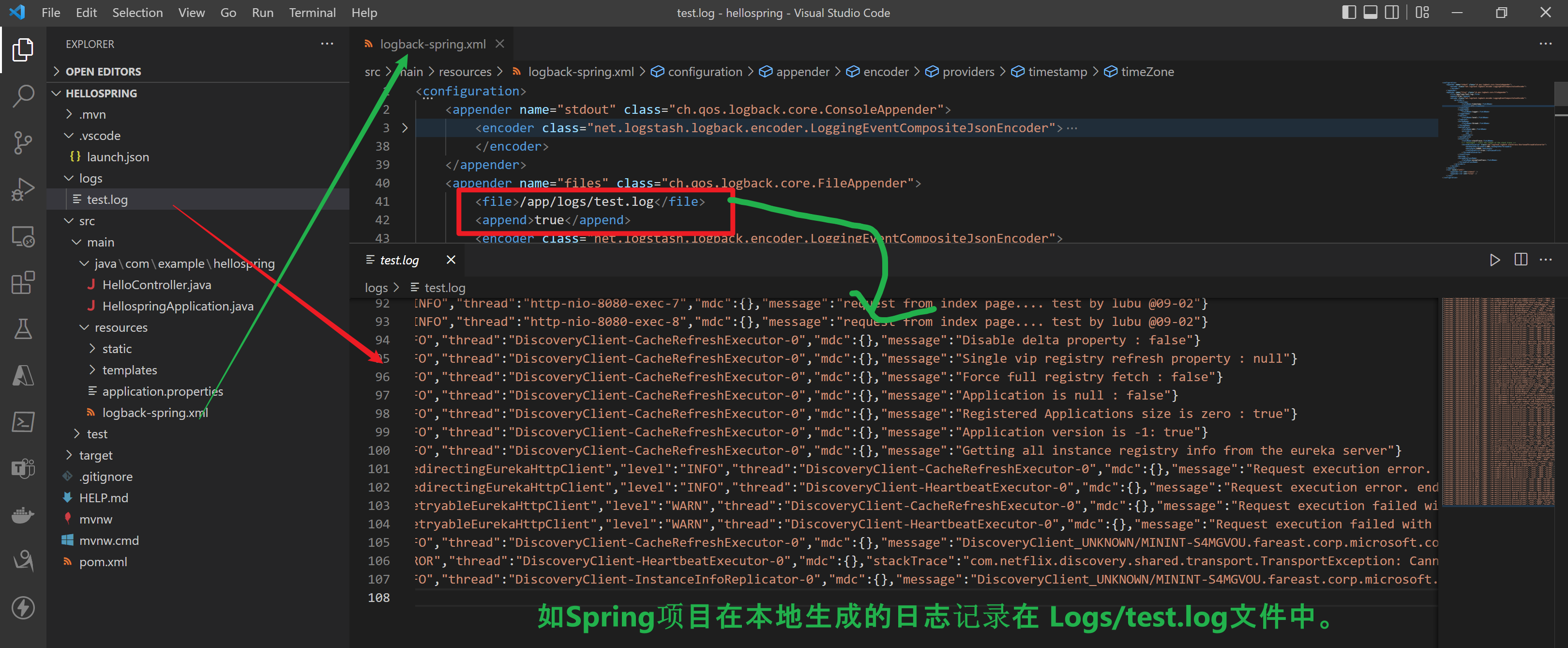
但是,如果应用中需要自行把日志写入到日志文件中,那么如果应用部署到Azure Spring Cloud 上后,如何来查看并获取到应用程序自身专门用于记录日志的文件呢?
问题解答
Azure Spring Cloud 与 App Service有较大的区别。App Service可以通过Kudu工具访问应用的文件系统,就可以在Home目录下直接看见应用程序生成的日志文件并下载。
而Spring Cloud服务,需要通过文件挂载(Mount)的方式,把一个存储账号(Storage Account)挂载到Spring Cloud的App上。
挂载Storage Account以及在代码中配置挂载后的日志路径步骤:
第一步:为Azure Spring Cloud服务添加一个Storage
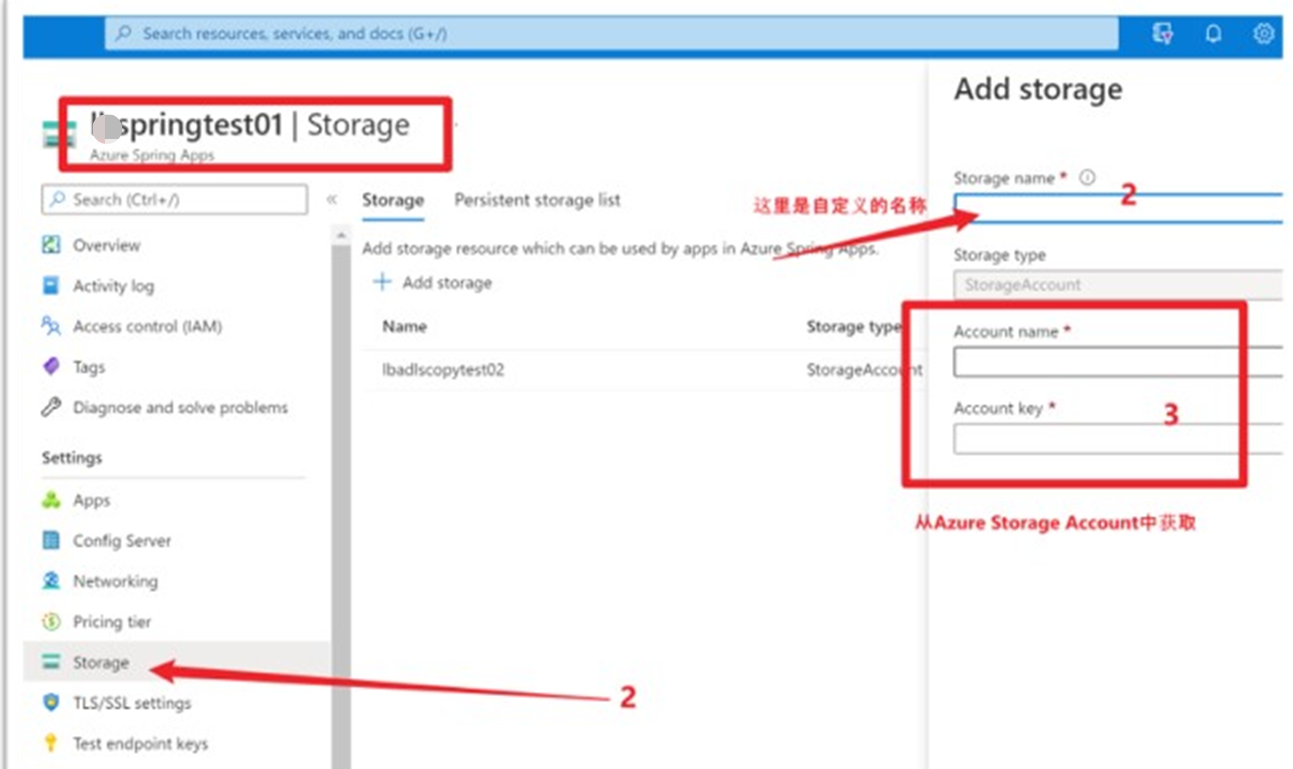
Storage name:为自定义名称,根据自己情况设定,如 springstorage01
Account name:为存储账号(Storage Account)的名称,需要从Azure Storage Account的页面中获取
Account Key:从Azure Storage Account的Access Key页面中获取。注意:此处只需要填写Access Key就可以,不需要完整的Conneciton String
第二步:为Spring Cloud App添加挂载
在Spring Cloud页面,点击“Apps”列举出所有的App。选中需要配置日志文件路径的应用。然后选择“Configuration” --> "Persistent Storage"
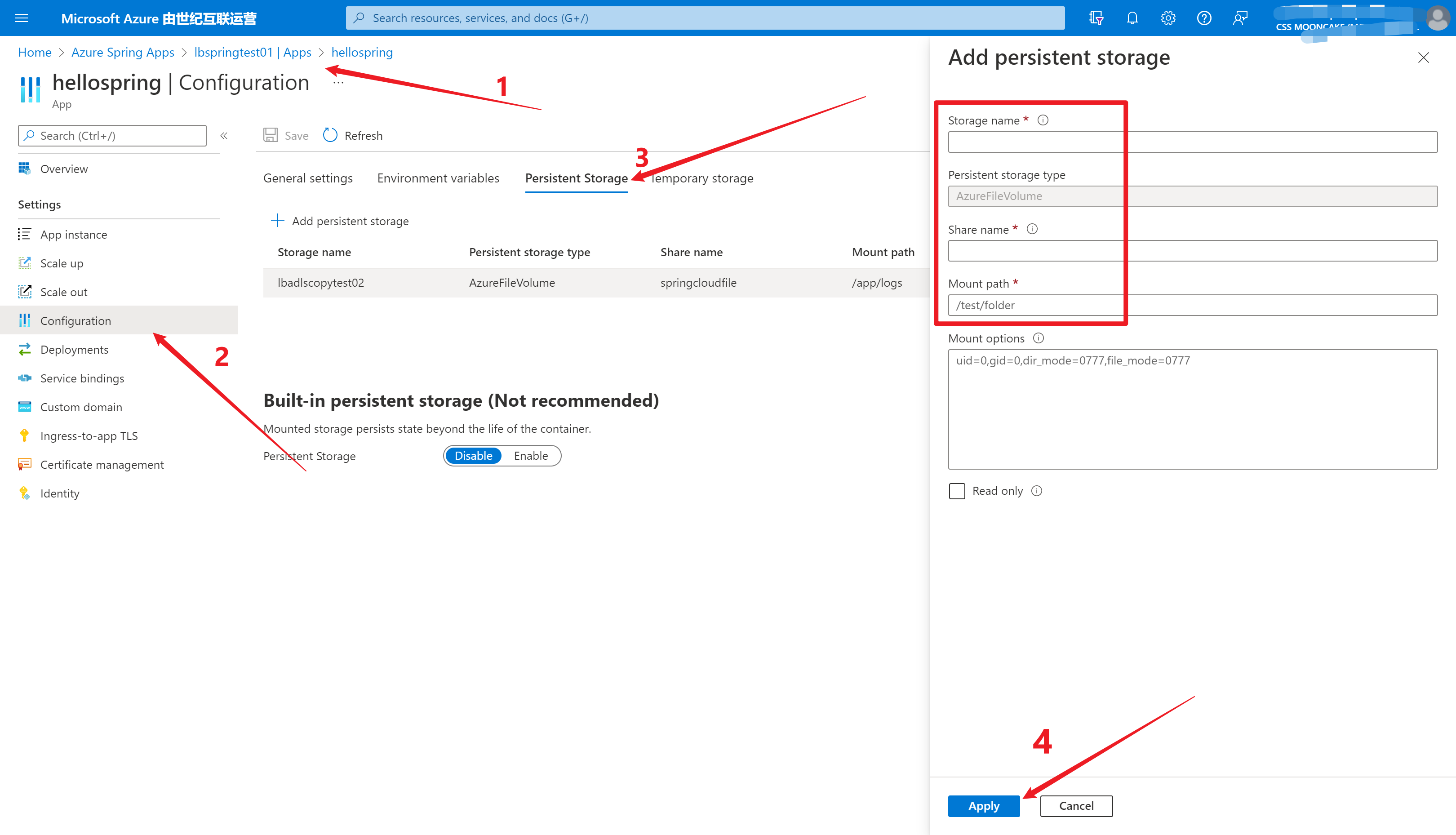
Storage Name:为第一步中自定义的Storage Name。
Share Name:为在Azure Storage Account的文件共享中所创建的一个共享文件夹。可以自定义文件夹名称。
Mount Path: 所挂载Spring Cloud App所运行实例上的文件路径。这一步的内容也是将在应用为日志文件所配置的存放路径。非常关键!如使用 /app/logs
第三步:在Java Spring应用中重新配置日志生成路径
修改应用中的日志保存路径。如本实例中使用的 logback-spring.xml 。 修改文件输出路径为: <file>/app/logs/test.log</file>
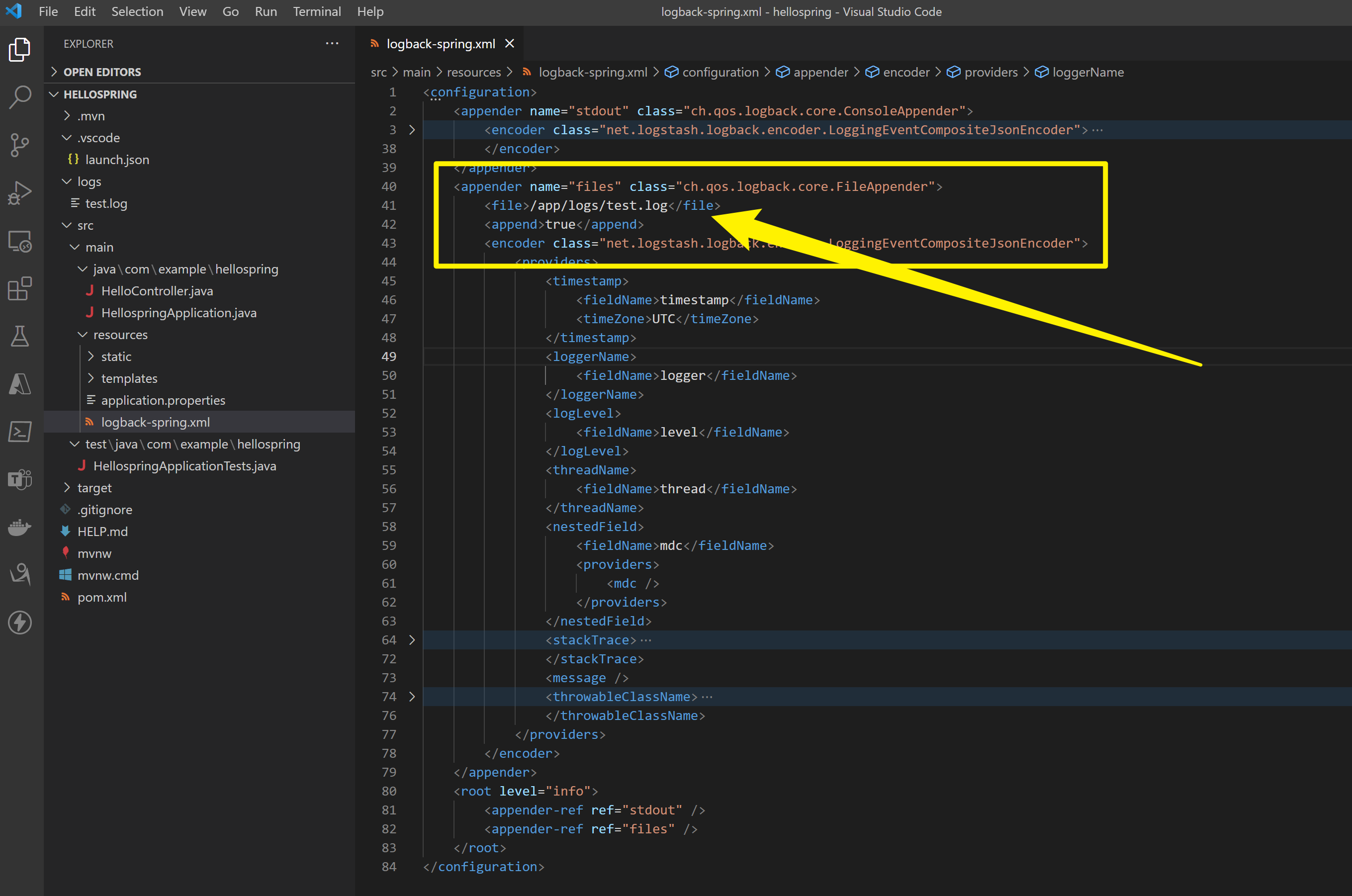
重新生成Jar文件并再次发布。
第四步: 在存储账号中检查应用日志
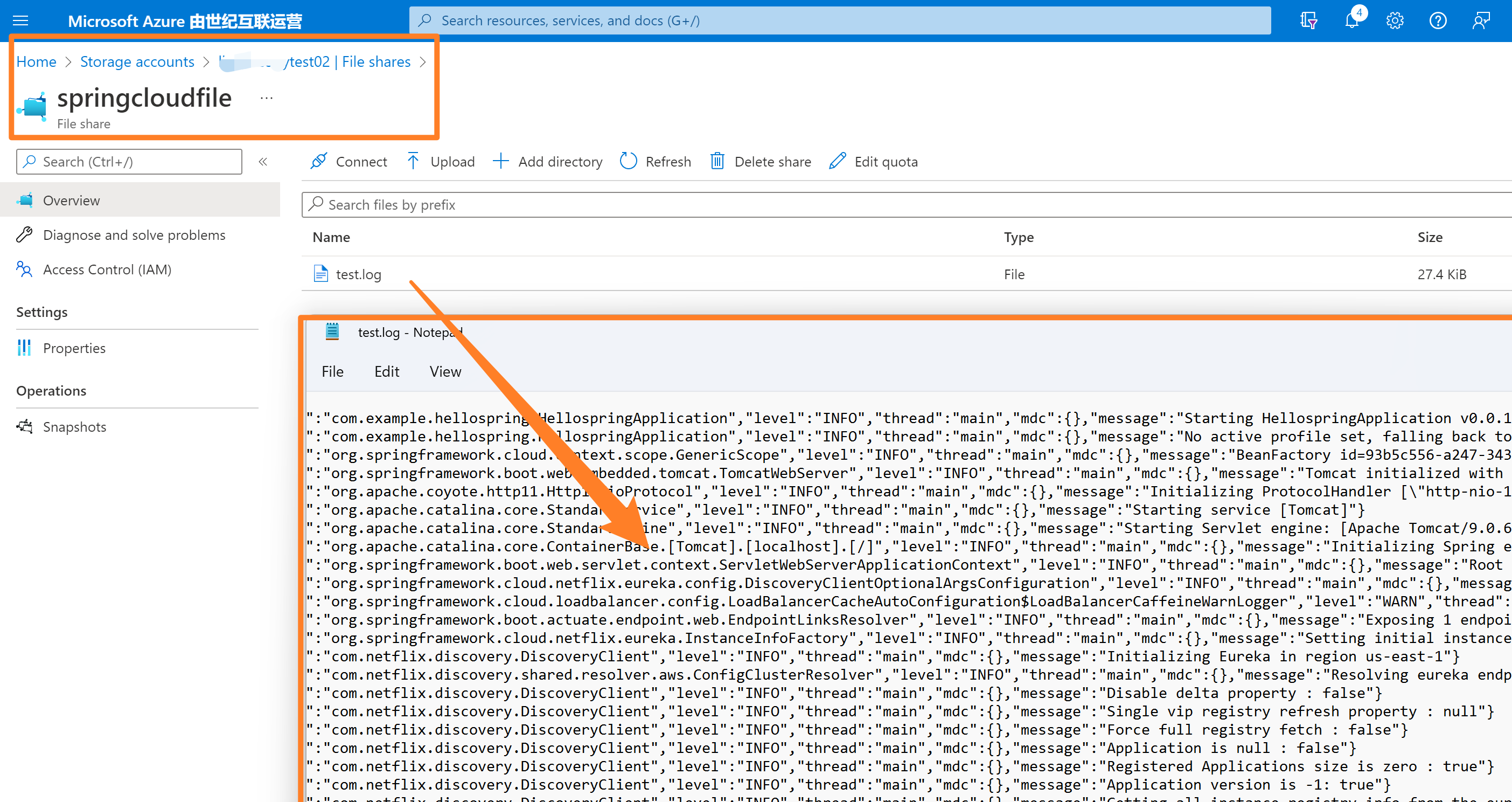
在Azure门户中,进入Storage Account中,查看Spring Cloud App的运行日志。如下:
附录:Spring Cloud应用示例代码
POM.XML 依赖包文件
<?xml version="1.0" encoding="UTF-8"?>
<project xmlns="http://maven.apache.org/POM/4.0.0" xmlns:xsi="http://www.w3.org/2001/XMLSchema-instance"
    xsi:schemaLocation="http://maven.apache.org/POM/4.0.0 https://maven.apache.org/xsd/maven-4.0.0.xsd">
    <modelVersion>4.0.0</modelVersion>
    <parent>
        <groupId>org.springframework.boot</groupId>
        <artifactId>spring-boot-starter-parent</artifactId>
        <version>2.6.11</version>
        <relativePath/> <!-- lookup parent from repository -->
    </parent>
    <groupId>com.example</groupId>
    <artifactId>hellospring</artifactId>
    <version>0.0.1-SNAPSHOT</version>
    <name>hellospring</name>
    <description>Demo project for Spring Boot</description>
    <properties>
        <java.version>1.8</java.version>
        <spring-cloud.version>2021.0.3</spring-cloud.version>
    </properties>
    <dependencies>
        <dependency>
            <groupId>org.springframework.boot</groupId>
            <artifactId>spring-boot-starter-actuator</artifactId>
        </dependency>
        <dependency>
            <groupId>org.springframework.boot</groupId>
            <artifactId>spring-boot-starter-web</artifactId>
        </dependency>
        <dependency>
            <groupId>org.springframework.cloud</groupId>
            <artifactId>spring-cloud-starter-config</artifactId>
        </dependency>
        <dependency>
            <groupId>org.springframework.cloud</groupId>
            <artifactId>spring-cloud-starter-netflix-eureka-client</artifactId>
        </dependency>

        <dependency>
            <groupId>org.springframework.boot</groupId>
            <artifactId>spring-boot-starter-test</artifactId>
            <scope>test</scope>
        </dependency>
        <dependency>
            <groupId>net.logstash.logback</groupId>
            <artifactId>logstash-logback-encoder</artifactId>
            <version>6.5</version>
        </dependency>
    </dependencies>
    <dependencyManagement>
        <dependencies>
            <dependency>
                <groupId>org.springframework.cloud</groupId>
                <artifactId>spring-cloud-dependencies</artifactId>
                <version>${spring-cloud.version}</version>
                <type>pom</type>
                <scope>import</scope>
            </dependency>
        </dependencies>
    </dependencyManagement>

    <build>
        <plugins>
            <plugin>
                <groupId>org.springframework.boot</groupId>
                <artifactId>spring-boot-maven-plugin</artifactId>
            </plugin>
        </plugins>
    </build>

</project>
application.properties 配置文件
spring.cloud.config.enabled=false
logback-spring.xml配置文件
<configuration>
    <appender name="stdout" class="ch.qos.logback.core.ConsoleAppender">
        <encoder class="net.logstash.logback.encoder.LoggingEventCompositeJsonEncoder">
            <providers>
                <timestamp>
                    <fieldName>timestamp</fieldName>
                    <timeZone>UTC</timeZone>
                </timestamp>
                <loggerName>
                    <fieldName>logger</fieldName>
                </loggerName>
                <logLevel>
                    <fieldName>level</fieldName>
                </logLevel>
                <threadName>
                    <fieldName>thread</fieldName>
                </threadName>
                <nestedField>
                    <fieldName>mdc</fieldName>
                    <providers>
                        <mdc />
                    </providers>
                </nestedField>
                <stackTrace>
                    <fieldName>stackTrace</fieldName>
                    <!-- maxLength - limit the length of the stack trace -->
                    <throwableConverter class="net.logstash.logback.stacktrace.ShortenedThrowableConverter">
                        <maxDepthPerThrowable>200</maxDepthPerThrowable>
                        <maxLength>14000</maxLength>
                        <rootCauseFirst>true</rootCauseFirst>
                    </throwableConverter>
                </stackTrace>
                <message />
                <throwableClassName>
                    <fieldName>exceptionClass</fieldName>
                </throwableClassName>
            </providers>
        </encoder>
    </appender>
    <appender name="files" class="ch.qos.logback.core.FileAppender">
        <file>/app/logs/test.log</file>
        <append>true</append>
        <encoder class="net.logstash.logback.encoder.LoggingEventCompositeJsonEncoder">
            <providers>
                <timestamp>
                    <fieldName>timestamp</fieldName>
                    <timeZone>UTC</timeZone>
                </timestamp>
                <loggerName>
                    <fieldName>logger</fieldName>
                </loggerName>
                <logLevel>
                    <fieldName>level</fieldName>
                </logLevel>
                <threadName>
                    <fieldName>thread</fieldName>
                </threadName>
                <nestedField>
                    <fieldName>mdc</fieldName>
                    <providers>
                        <mdc />
                    </providers>
                </nestedField>
                <stackTrace>
                    <fieldName>stackTrace</fieldName>
                    <!-- maxLength - limit the length of the stack trace -->
                    <throwableConverter class="net.logstash.logback.stacktrace.ShortenedThrowableConverter">
                        <maxDepthPerThrowable>200</maxDepthPerThrowable>
                        <maxLength>14000</maxLength>
                        <rootCauseFirst>true</rootCauseFirst>
                    </throwableConverter>
                </stackTrace>
                <message />
                <throwableClassName>
                    <fieldName>exceptionClass</fieldName>
                </throwableClassName>
            </providers>
        </encoder>
    </appender>
    <root level="info">
        <appender-ref ref="stdout" />
        <appender-ref ref="files" />
    </root>
</configuration>
HelloController.java 代码
package com.example.hellospring;

import org.springframework.web.bind.annotation.RestController;
import org.slf4j.LoggerFactory;
import org.springframework.web.bind.annotation.RequestMapping;

@RestController
public class HelloController {

    org.slf4j.Logger logger = LoggerFactory.getLogger(getClass());

    @RequestMapping("/")
    public String index() {

        logger.info("Loging into Storage Folder.... request from index page.... test by lb @09-02");

        return "Greetings from Azure Spring Cloud!";
    }

}
HellospringApplication.java 代码
package com.example.hellospring;

import org.springframework.boot.SpringApplication;
import org.springframework.boot.autoconfigure.SpringBootApplication;

@SpringBootApplication
public class HellospringApplication {

    public static void main(String[] args) {
        SpringApplication.run(HellospringApplication.class, args);
    }

}
参考资料
快速入门:在 Azure Spring Cloud 中部署你的第一个应用程序:https://docs.azure.cn/zh-cn/spring-cloud/quickstart?tabs=Azure-CLI#build-and-deploy-the-app
日志: https://docs.azure.cn/zh-cn/spring-cloud/quickstart-logs-metrics-tracing?tabs=Azure-CLI
正在加载评论...