问题描述
参考官方文档(使用 Python 创建你的第一个持久函数:https://learn.microsoft.com/zh-cn/azure/azure-functions/durable/quickstart-python-vscode), 部署后,却出现“Failed to load function”错误。
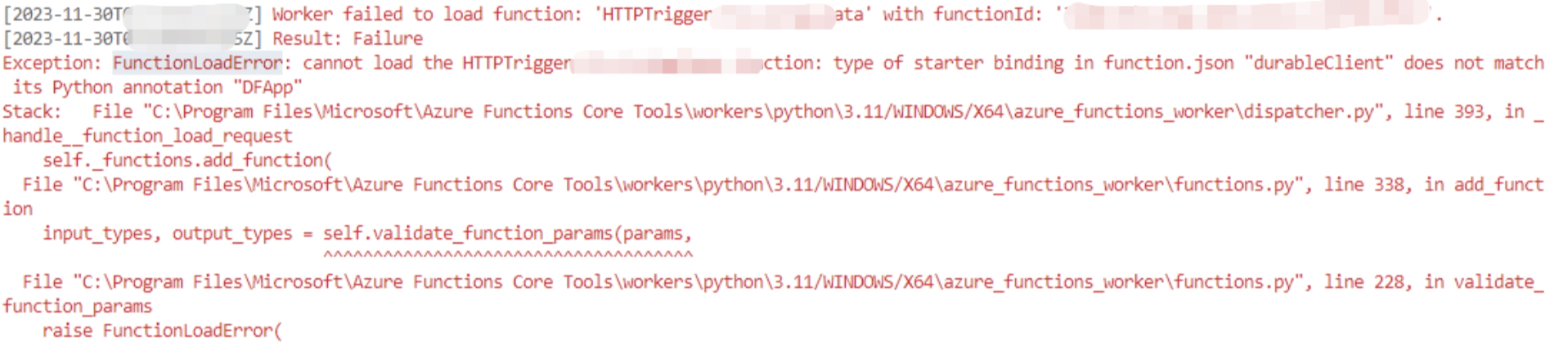
在结合以上参考文档后,可以通过如下的步骤创建并运行 Python Durable Function(Model V2)。
检查步骤
第一 : 确保 requirements.txt 包含下面二行内容
azure-functions
azure-functions-durable
第二: 打开 VS Code 的 Terminal 命令行,在Function目录下运行下面几行命令:
python -m pip install -r requirements.txt
python.exe -m pip install --upgrade pip
pip install azure-functions-durable
第三 : 在本地文件 local.setting.json 检查是否有AzureWebJobsFeatureFlags字段 , 同样云端的Function Application Settings 中,也必须有AzureWebJobsFeatureFlags参数
"AzureWebJobsFeatureFlags": "EnableWorkerIndexing"
<img alt="A computer screen shot of a program
Description automatically generated" width="345" height="137" id="x_Picture_x0020_6" border="0" data-imagetype="AttachmentByCid" data-custom="AAkALgAAAAAAHYQDEapmEc2byACqAC%2FEWg0AUHHEdoXLVUuQ3tUBc9EBJAAE3eGBDAAAARIAEAB09jxvslYFSperDi1AmjLD" src="https://myblogfiles.blob.core.windows.net/blog-assets/posts/2026032088386/20260320-112553-e16e7c0a0e704f9bbb026a2593ce8b27.png">
第四: 在本地测试运行, 最好连接到 真实的Azure Storage Account, 本地模拟的Storage 有时候不工作
"AzureWebJobsStorage": "DefaultEndpointsProtocol=https;AccountName=xxxxxx
第五 : 查看本地目录下, 确保有这几个 Durable Python V2 的核心文件
function_app.py
host.json
requirements.txt
<img alt="A black screen with white text
Description automatically generated" width="225" height="76" id="x_Picture_x0020_7" border="0" data-imagetype="AttachmentByCid" data-custom="AAkALgAAAAAAHYQDEapmEc2byACqAC%2FEWg0AUHHEdoXLVUuQ3tUBc9EBJAAE3eGBDAAAARIAEABxUjbWMjkiTb7Rlq1GMV0y" src="https://myblogfiles.blob.core.windows.net/blog-assets/posts/2026032088386/20260320-112554-f5a0f5a127134907a75500af10250423.png">
第六:Python Model V2 Durable Function 示例代码
文件名 function_app.py
import azure.functions as func
import azure.durable_functions as df
myApp = df.DFApp(http_auth_level=func.AuthLevel.ANONYMOUS)

# An HTTP-Triggered Function with a Durable Functions Client binding
@myApp.route(route="httproute")
@myApp.durable_client_input(client_name="client")
async def http_start(req: func.HttpRequest, client):
    #function_name = req.route_params.get('functionName')
    function_name = "hello_orchestrator"
    instance_id = await client.start_new(function_name)
    response = client.create_check_status_response(req, instance_id)
    return response

# Orchestrator
@myApp.orchestration_trigger(context_name="context")
def hello_orchestrator(context):
    result1 = yield context.call_activity("get_result", "Seattle")
    result2 = yield context.call_activity("get_result", "Tokyo")
    result3 = yield context.call_activity("get_result", "London")
    return [result1, result2, result3]

# Activity
@myApp.activity_trigger(input_name="city")
def get_result(city: str):
    return "Hello " + city
第七: 本地测试
http://localhost:7071/api/httproute 这个可以返回 statusQueryGetUri 的 url ,http://localhost:7071/runtime/webhooks/durabletask/instances/xxxxxxxxxxxxxxxxx?taskHub=TestHubName&connection=Storage&code=xxxxxxxxxxxxxxxx,然后通过上面url 就可以看到 activity 的 结果了。

参考资料
使用 Python 创建你的第一个持久函数:https://learn.microsoft.com/zh-cn/azure/azure-functions/durable/quickstart-python-vscode
正在加载评论...