问题描述
介绍一段Python脚本,可以在微软云中国区使用。
用于计算Azure Storage Account中Container中Blob类型文件的数量和大小,脚本中允许按照容器,层(热/冷/归档),前缀,软删除/非软删除来计算数量和容量大小, 默认使用的时间为以Blob的最后修改时间作为参考。
执行结果参考:
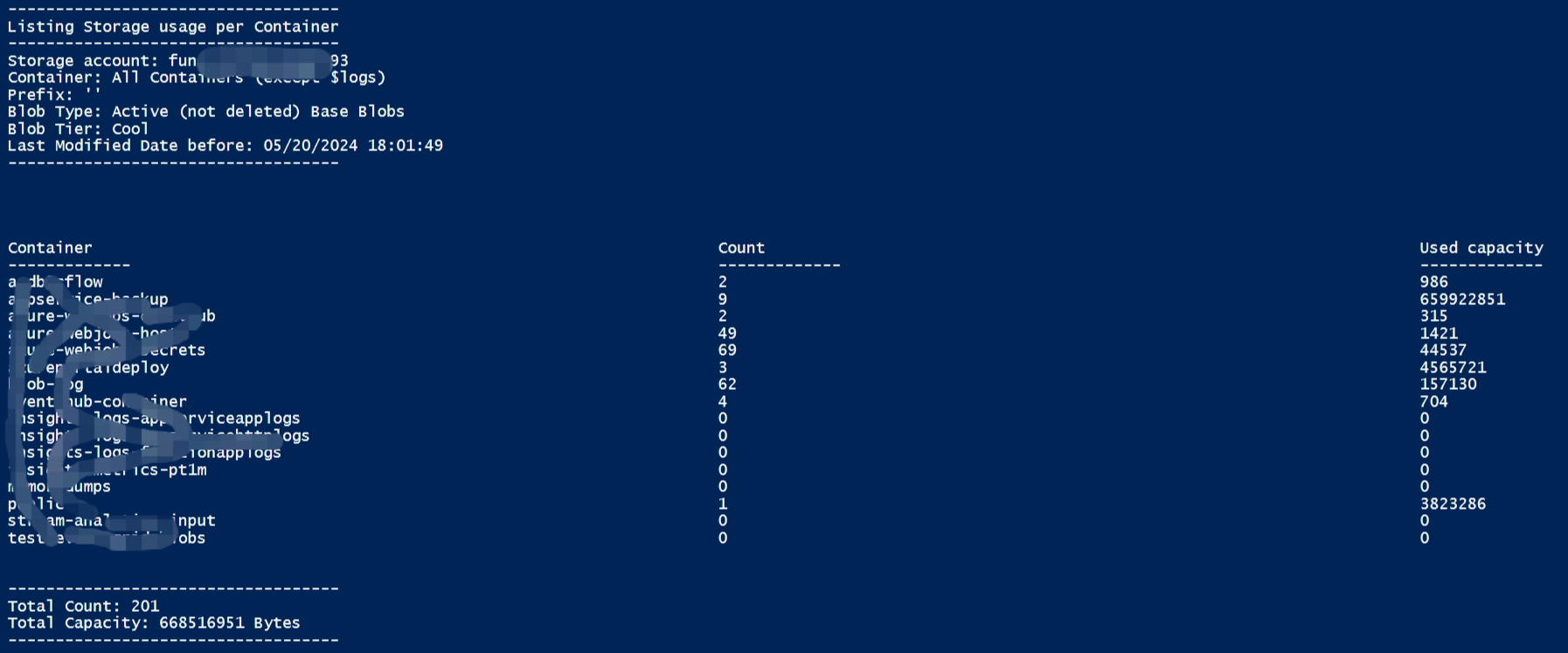
参数介绍
所有值都是强制性的,有些可以为空,参考如下的描述以及脚本中解释。
$storageAccountName - 只需运行脚本,系统就会询问存储帐户名称。
$containerName - 指定一些容器名称,或为空(默认值)以列出所有容器
$prefix - 指定一些用于扫描的 blob 前缀(不包括容器名称),或留空(默认值)以列出所有对象
$deleted - 指定“True”以仅列出软删除对象,“False”以仅列出非软删除对象(活动对象 - 默认值),或指定“All”以列出活动和软删除对象
$blobType - 选择“Base”仅列出基本 Blob(默认值),“Snapshots”仅列出快照,“Versions”仅列出版本,“Versions+Snapshots”仅列出版本和快照,或“所有类型”列出所有对象(基本 Blob、版本和快照)
$accessTier - 选择“Hot”仅列出“Hot”层中的对象,“Cool”仅列出“Cool”层中的对象,“Archive”仅列出存档层中的对象,或选择“All”以列出所有层中的对象(Hot、酷并存档)
$Year、$Month、$Day - 定义一个日期,仅列出上次修改日期之前或等于该日期的对象 - 如果至少有一个值为空,则将使用当前日期。
注意
此脚本不会支持统计 ADLS Gen2 帐户中的文件夹。
只需运行脚本就会要求提供 AAD 凭据并选择要列出的存储帐户名称。
默认情况下(不更改任何参数,脚本将列出存储帐户中所有容器上、所有访问层的所有基本 Blob,且上次修改日期早于或等于当前日期时间。
所有其他选项(上面)应在脚本中定义。
这可能需要数(小时/天)才能完成,具体取决于容器或存储帐户中的 blob、版本和快照的数量。
$logs 容器中的内容不被统计(不支持)
权限
若要使用 AAD 列出 Blob,执行脚本的Azure账号(或AAD 应用)需要拥有“Storage Blob Data Reader (存储 Blob 数据读取者)”角色。 否则,会遇见权限错误“The client 'xxx@xxxx.partner.onmschina.cn' with object id 'xx-x-x-x-xxx' does not have authorization to perform action 'Microsoft.Storage/storageAccounts/listKeys/action' over scope '/subscriptions/xxxxx' or the scope is invalid.”, 参考文档(
用于 Blob 的 Azure 内置角色:https://learn.microsoft.com/zh-cn/azure/storage/blobs/authorize-access-azure-active-directory#azure-built-in-roles-for-blobs)
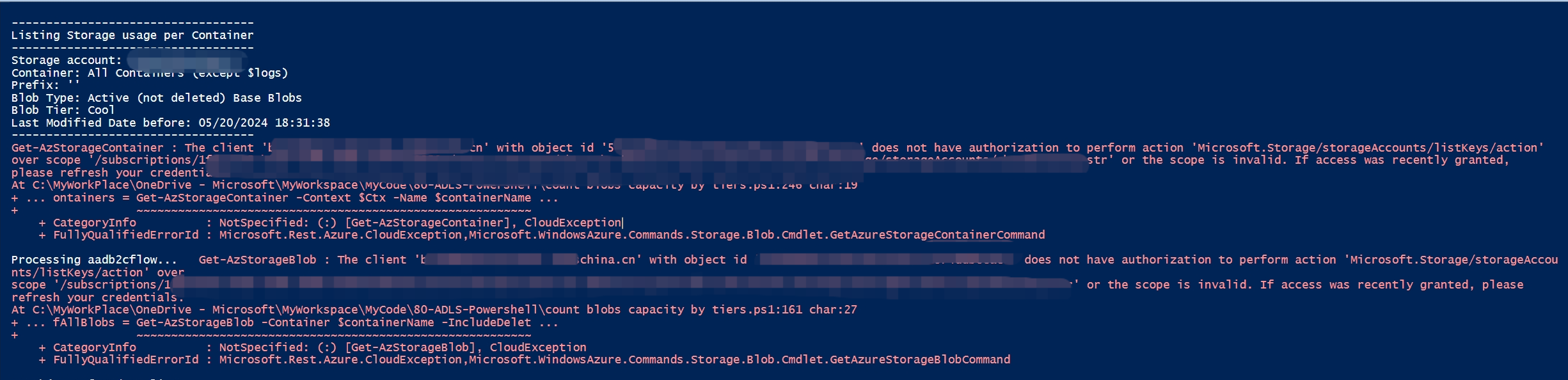
脚本全文
  1 # ====================================================================================
  2 # Azure Storage Blob calculator:
  3 # Base Blobs, Blob Snapshots, Versions, Deleted / not Deleted, by Container, by tier, with prefix and considering Last Modified Date
  4 # ====================================================================================
  5 # This PowerShell script will count and calculate blob usage on each container, or in some specific container in the provided Storage account
  6 # Filters can be used based on
  7 #     All containers or some specific Container
  8 #     Base Blobs, Blob Snapshots, Versions, All
  9 #     Hot, Cool, Archive or All Access Tiers
 10 #     Deleted, Not Deleted or All
 11 #     Filtered by prefix
 12 #     Filtered by Last Modified Date
 13 # This can take some hours to complete, depending of the amount of blobs, versions and snapshots in the container or Storage account.
 14 # $logs container is not covered  by this script (not supported)
 15 # By default, this script List All non Soft Deleted Base Blobs, in All Containers, with All Access Tiers
 16 # ====================================================================================
 17 # DISCLAMER : Please note that this script is to be considered as a sample and is provided as is with no warranties express or implied, even more considering this is about deleting data.
 18 # You can use or change this script at you own risk.
 19 # ====================================================================================
 20 # PLEASE NOTE :
 21 # - This script does not recover folders on ADLS Gen2 accounts.
 22 # - Just run the script and your AAD credentials and the storage account name to list will be asked.
 23 # - All other values should be defined in the script, under 'Parameters - user defined' section.
 24 # - Uncomment line 180 (line after # DEBUG) to get the full list of all selected objects
 25 # ====================================================================================
 26 #
 27 # ====================================================================================
 28 # Corrected:
 29 #  - Null array exception for empty containers
 30 #  - Added capacity unit "Bytes" in the output
 31 #  - Added options to select Tenant and Subscription
 32
 33 # sign in
 34 Write-Host "Logging in...";
 35
 36 ## For globa azure
 37 #Connect-AzAccount;
 38
 39 # For china azure
 40 Connect-AzAccount -Environment AzureChinaCloud
 41
 42 $tenantId = Get-AzTenant | Select-Object Id, Name | Out-GridView -Title 'Select your Tenant' -PassThru  -ErrorAction Stop
 43 $subscId = Get-AzSubscription -TenantId $tenantId.Id | Select-Object TenantId, Id, Name | Out-GridView -Title 'Select your Subscription' -PassThru  -ErrorAction Stop
 44
 45 $subscriptionId = $subscId.Id;
 46 if(!$subscriptionId)
 47 {
 48     Write-Host "----------------------------------";
 49     Write-Host "No subscription was selected.";
 50     Write-Host "Exiting...";
 51     Write-Host "----------------------------------";
 52     Write-Host " ";
 53     exit;
 54 }
 55
 56 # select subscription
 57 Write-Host "Selecting subscription '$subscriptionId'";
 58 Set-AzContext -SubscriptionId $subscriptionId;
 59 CLS
 60
 61 #----------------------------------------------------------------------
 62 # Parameters - user defined
 63 # 参数定义部分
 64 #----------------------------------------------------------------------
 65 $selectedStorage = Get-AzStorageAccount  | Out-GridView -Title 'Select your Storage Account' -PassThru  -ErrorAction Stop
 66 $resourceGroupName = $selectedStorage.ResourceGroupName
 67 $storageAccountName = $selectedStorage.StorageAccountName
 68
 69 $containerName = ''             # Container Name, or empty to all containers
 70 $prefix = ''                    # Set prefix for scanning (optional)
 71
 72 $deleted = 'False'              # valid values: 'True' / 'False' / 'All'
 73 $blobType = 'Base'              # valid values: 'Base' / 'Snapshots' / 'Versions' / 'Versions+Snapshots' / 'All Types'
 74 $accessTier = 'Cool'             # valid values: 'Hot', 'Cool', 'Archive', 'All'
 75
 76 # Select blobs before Last Modified Date (optional) - if all three empty, current date will be used
 77 $Year = ''
 78 $Month = ''
 79 $Day = ''
 80 #----------------------------------------------------------------------
 81 if($storageAccountName -eq $Null) { break }
 82
 83
 84 #----------------------------------------------------------------------
 85 # Date format
 86 #----------------------------------------------------------------------
 87 if ($Year -ne '' -and $Month -ne '' -and $Day -ne '')
 88 {
 89     $maxdate = Get-Date -Year $Year -Month $Month -Day $Day -ErrorAction Stop
 90 } else {
 91     $maxdate = Get-Date
 92 }
 93 #----------------------------------------------------------------------
 94
 95
 96
 97 #----------------------------------------------------------------------
 98 # Format String Details in user friendy format
 99 #----------------------------------------------------------------------
100 switch($blobType)
101 {
102     'Base'               {$strBlobType = 'Base Blobs'}
103     'Snapshots'          {$strBlobType = 'Snapshots'}
104     'Versions+Snapshots' {$strBlobType = 'Versions & Snapshots'}
105     'Versions'           {$strBlobType = 'Blob Versions only'}
106     'All Types'          {$strBlobType = 'All blobs (Base Blobs + Versions + Snapshots)'}
107 }
108 switch($deleted)
109 {
110     'True'               {$strDeleted = 'Only Deleted'}
111     'False'              {$strDeleted = 'Active (not deleted)'}
112     'All'                {$strDeleted = 'All (Active+Deleted)'}
113 }
114 if ($containerName -eq '') {$strContainerName = 'All Containers (except $logs)'} else {$strContainerName = $containerName}
115 #----------------------------------------------------------------------
116
117
118
119 #----------------------------------------------------------------------
120 # Show summary of the selected options
121 #----------------------------------------------------------------------
122 function ShowDetails ($storageAccountName, $strContainerName, $prefix, $strBlobType, $accessTier, $strDeleted, $maxdate)
123 {
124     # CLS
125
126     write-host " "
127     write-host "-----------------------------------"
128     write-host "Listing Storage usage per Container"
129     write-host "-----------------------------------"
130
131     write-host "Storage account: $storageAccountName"
132     write-host "Container: $strContainerName"
133     write-host "Prefix: '$prefix'"
134     write-host "Blob Type: $strDeleted $strBlobType"
135     write-host "Blob Tier: $accessTier"
136     write-host "Last Modified Date before: $maxdate"
137     write-host "-----------------------------------"
138 }
139 #----------------------------------------------------------------------
140
141
142
143 #----------------------------------------------------------------------
144 #  Filter and count blobs in some specific Container
145 #----------------------------------------------------------------------
146 function ContainerList ($containerName, $ctx, $prefix, $blobType, $accessTier, $deleted, $maxdate)
147 {
148
149     $count = 0
150     $capacity = 0
151
152     $blob_Token = $Null
153     $exception = $Null
154
155     write-host -NoNewline "Processing $containerName...   "
156
157     do
158     {
159
160         # all Blobs, Snapshots
161         $listOfAllBlobs = Get-AzStorageBlob -Container $containerName -IncludeDeleted -IncludeVersion -Context $ctx  -ContinuationToken $blob_Token -Prefix $prefix -MaxCount 5000 -ErrorAction Stop
162         if($listOfAllBlobs.Count -le 0) {
163             write-host "No Objects found to list"
164             break
165         }
166
167         #------------------------------------------
168         # Filtering blobs by type
169         #------------------------------------------
170         switch($blobType)
171         {
172             'Base'               {$listOfBlobs = $listOfAllBlobs | Where-Object { $_.IsLatestVersion -eq $true -or ($_.SnapshotTime -eq $null -and $_.VersionId -eq $null) } }   # Base Blobs - Base versions may have versionId
173             'Snapshots'          {$listOfBlobs = $listOfAllBlobs | Where-Object { $_.SnapshotTime -ne $null } }                                                                  # Snapshots
174             'Versions+Snapshots' {$listOfBlobs = $listOfAllBlobs | Where-Object { $_.IsLatestVersion -ne $true -and (($_.SnapshotTime -eq $null -and $_.VersionId -ne $null) -or $_.SnapshotTime -ne $null) } }  # Versions & Snapshotsk
175             'Versions'           {$listOfBlobs = $listOfAllBlobs | Where-Object { $_.IsLatestVersion -ne $true -and $_.SnapshotTime -eq $null -and $_.VersionId -ne $null} }     # Versions only
176             'All Types'          {$listOfBlobs = $listOfAllBlobs } # All - Base Blobs + Versions + Snapshots
177         }
178
179
180         #------------------------------------------
181         # filter by Deleted / not Deleted / all
182         #------------------------------------------
183         switch($deleted)
184         {
185             'True'               {$listOfBlobs = $listOfBlobs | Where-Object { ($_.IsDeleted -eq $true)} }   # Deleted
186             'False'              {$listOfBlobs = $listOfBlobs | Where-Object { ($_.IsDeleted -eq $false)} }  # Not Deleted
187             # 'All'              # All Deleted + Not Deleted
188         }
189
190         # filter by Last Modified Date
191         $listOfBlobs = $listOfBlobs | Where-Object { ($_.LastModified -le $maxdate)}   # <= Last Modified Date
192
193
194         #Filter by Access Tier
195         if($accessTier -ne 'All')
196            {$listOfBlobs = $listOfBlobs | Where-Object { ($_.accesstier -eq $accessTier)} }
197
198
199
200         #------------------------------------------
201         # Count and used Capacity
202         # Count includes folder/subfolders on ADLS Gen2 Storage accounts
203         #------------------------------------------
204         foreach($blob in $listOfBlobs)
205         {
206             # DEBUG - Uncomment next line to have a full list of selected objects
207             # write-host $blob.Name " Content-length:" $blob.Length " Access Tier:" $blob.accesstier " LastModified:" $blob.LastModified  " SnapshotTime:" $blob.SnapshotTime " URI:" $blob.ICloudBlob.Uri.AbsolutePath  " IslatestVersion:" $blob.IsLatestVersion  " Lease State:" $blob.ICloudBlob.Properties.LeaseState  " Version ID:" $blob.VersionID
208
209             $count++
210             $capacity = $capacity + $blob.Length
211         }
212
213         $blob_Token = $listOfAllBlobs[$listOfAllBlobs.Count -1].ContinuationToken;
214
215
216     }while ($blob_Token -ne $Null)
217
218     write-host "  Count: $count    Capacity: $capacity Bytes"
219
220
221     return $count, $capacity
222 }
223 #----------------------------------------------------------------------
224
225 $totalCount = 0
226 $totalCapacity = 0
227
228 # $ctx = New-AzStorageContext -StorageAccountName $storageAccountName -UseConnectedAccount -ErrorAction Stop
229 $ctx = (Get-AzStorageAccount -ResourceGroupName $resourceGroupName -StorageAccount $storageAccountName).Context
230
231 ShowDetails $storageAccountName $strContainerName $prefix $strBlobType $accessTier $strDeleted $maxdate
232
233
234 $arr = "Container", "Count", "Used capacity"
235 $arr = $arr + "-------------", "-------------", "-------------"
236
237
238 $container_Token = $Null
239
240
241 #----------------------------------------------------------------------
242 # Looping Containers
243 #----------------------------------------------------------------------
244 do {
245
246     $containers = Get-AzStorageContainer -Context $Ctx -Name $containerName -ContinuationToken $container_Token -MaxCount 5000 -ErrorAction Stop
247
248
249     if ($containers -ne $null)
250     {
251         $container_Token = $containers[$containers.Count - 1].ContinuationToken
252
253         for ([int] $c = 0; $c -lt $containers.Count; $c++)
254         {
255             $container = $containers[$c].Name
256
257             $count, $capacity, $exception =  ContainerList $container $ctx $prefix $blobType $accessTier $deleted $maxdate
258             $arr = $arr + ($container, $count, $capacity)
259
260             $totalCount = $totalCount +$count
261             $totalCapacity = $totalCapacity + $capacity
262         }
263     }
264
265 } while ($container_Token -ne $null)
266
267 write-host "-----------------------------------"
268 #----------------------------------------------------------------------
269
270
271 #----------------------------------------------------------------------
272 # Show details in user friendly format and Totals
273 #----------------------------------------------------------------------
274 for ($i=0; $i -lt 15; $i++) { write-host " " }
275 ShowDetails $storageAccountName $strContainerName $prefix $strBlobType $accessTier $strDeleted $maxdate
276 $arr | Format-Wide -Property {$_} -Column 3 -Force
277
278 write-host "-----------------------------------"
279 write-host "Total Count: $totalCount"
280 write-host "Total Capacity: $totalCapacity Bytes"
281 write-host "-----------------------------------"
282 #----------------------------------------------------------------------
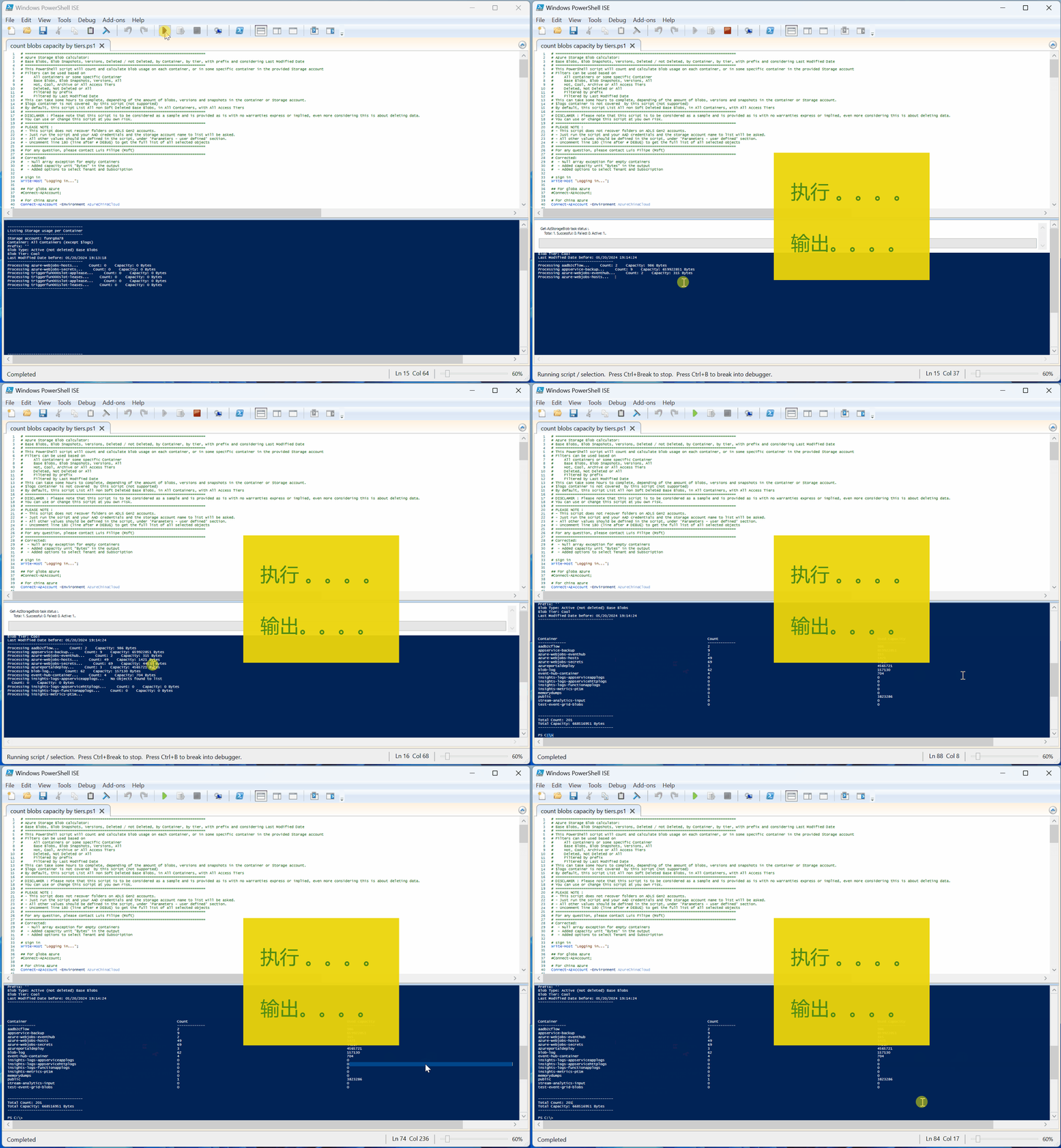
效果展示
参考文档
Azure Storage Blob Count & Capacity usage Calculator :https://techcommunity.microsoft.com/t5/azure-paas-blog/azure-storage-blob-count-amp-capacity-usage-calculator/ba-p/3516855
正在加载评论...