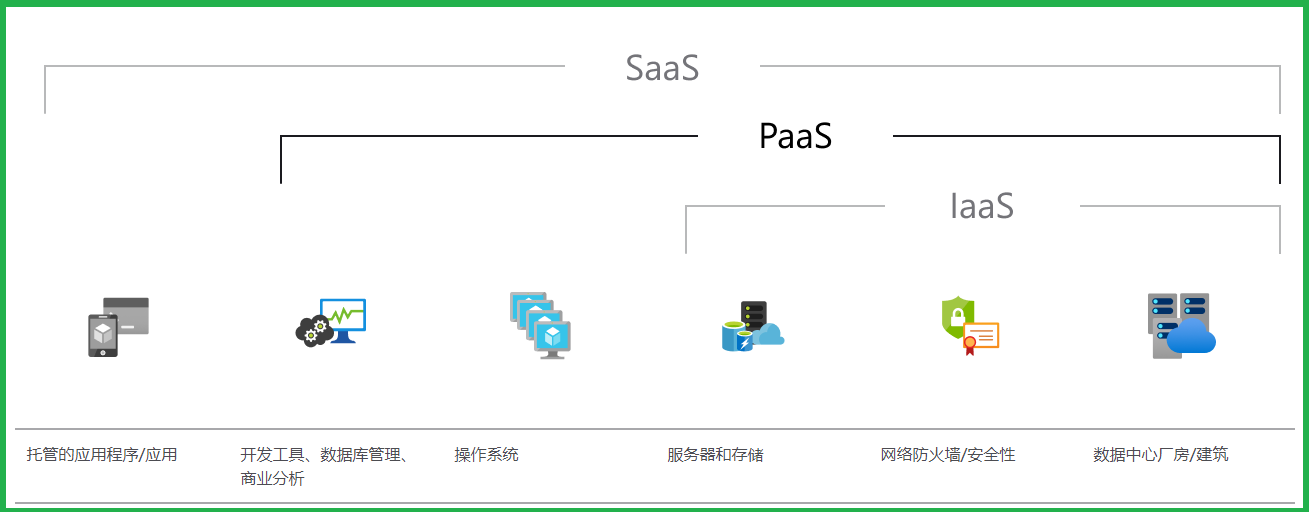
什么是 PaaS?Platform as a Service
平台即服务 (PaaS) 是云中的完整开发和部署环境,你可以使用其中资源交付内容,从基于云的简单应用到启用云的复杂企业应用程序皆可。你以即用即付的方式从云服务提供商处购买所需资源,并通过安全的 Internet 连接访问这些资源。
类似 IaaS,PaaS 也包括服务器、存储空间和网络等基础结构,但它还包括中间件、开发工具、商业智能 (BI) 服务和数据库管理系统等。PaaS 旨在支持 Web 应用程序的完整生命周期:生成、测试、部署、管理和更新。
PaaS 让你无需购买和管理软件许可证、底层应用程序基础结构和中间件、容器业务流程协调程序(如 Kubernetes)或开发工具及其他资源,从而避免了开支和复杂操作。你管理自己开发的应用程序和服务,剩余事项一般由云服务提供商负责。
问题描述
Azure Cloud Service: 是平台即服务 (PaaS) 的一个示例,是一项基于 HTTP 的服务,用于托管 Web 应用程序、REST API 和移动后端 。它托管在虚拟机 (VM) 上,通过 IIS 自动部署和托管应用。
所以,当我们想要修改IIS的一些默认的配置时,如何操作呢?
IdleTimeout: 默认值为20分钟,如果在20分钟Site不活动的情况下(没有新请求进入),IIS将终止工作进程以释放资源。
**Start Mode:**工作进程启动模式, AlwaysRunning(一直运行:如果Application Pool正在运行,请立即启动w3wp.exe进程。) OnDemand(按需启动:如果Application Pool正在运行,则在有第一个入站应用程序请求时启动w3wp.exe进程)
**Recycling.PeriodicRestart.Time(Regular Time Interval):**默认值为1740分钟,29小时。当Application Pool每运行29小时后,会自动回收。然后重启Application Pool。
在部署云服务(Cloud Service)时,有多种方式实现以上的修改。如添加启动任务通过CMD命令修改IIS配置(见文末附件部分),或通过代码修改,在WebRole的OnStart()方法中实现(本文就介绍代码如何实现)。
实现代码
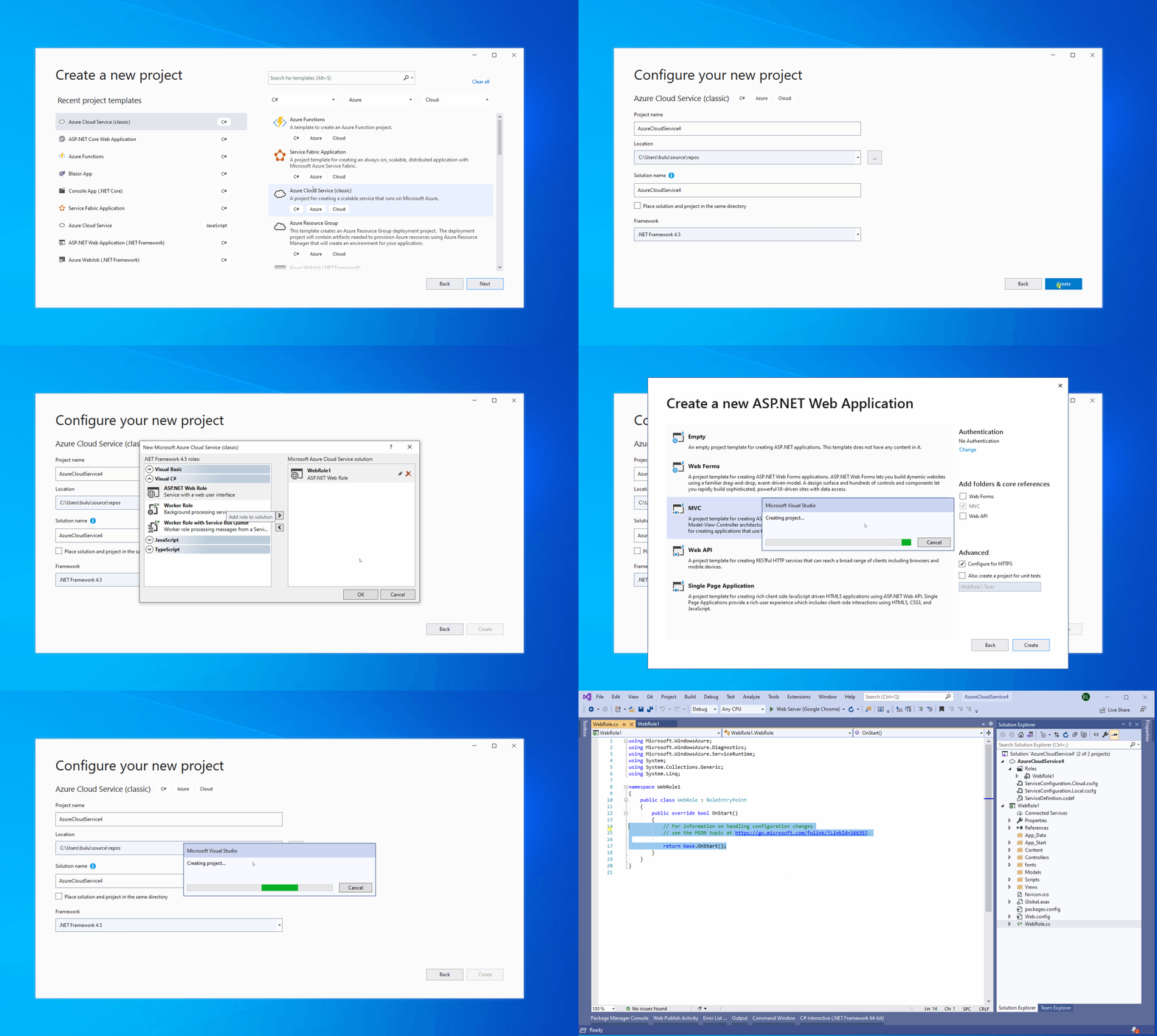
**准备条件:**参考官方快速入门,使用VS 2019快速创建Cloud Service项目(Azure 云服务(经典)和 ASP.NET 入门)
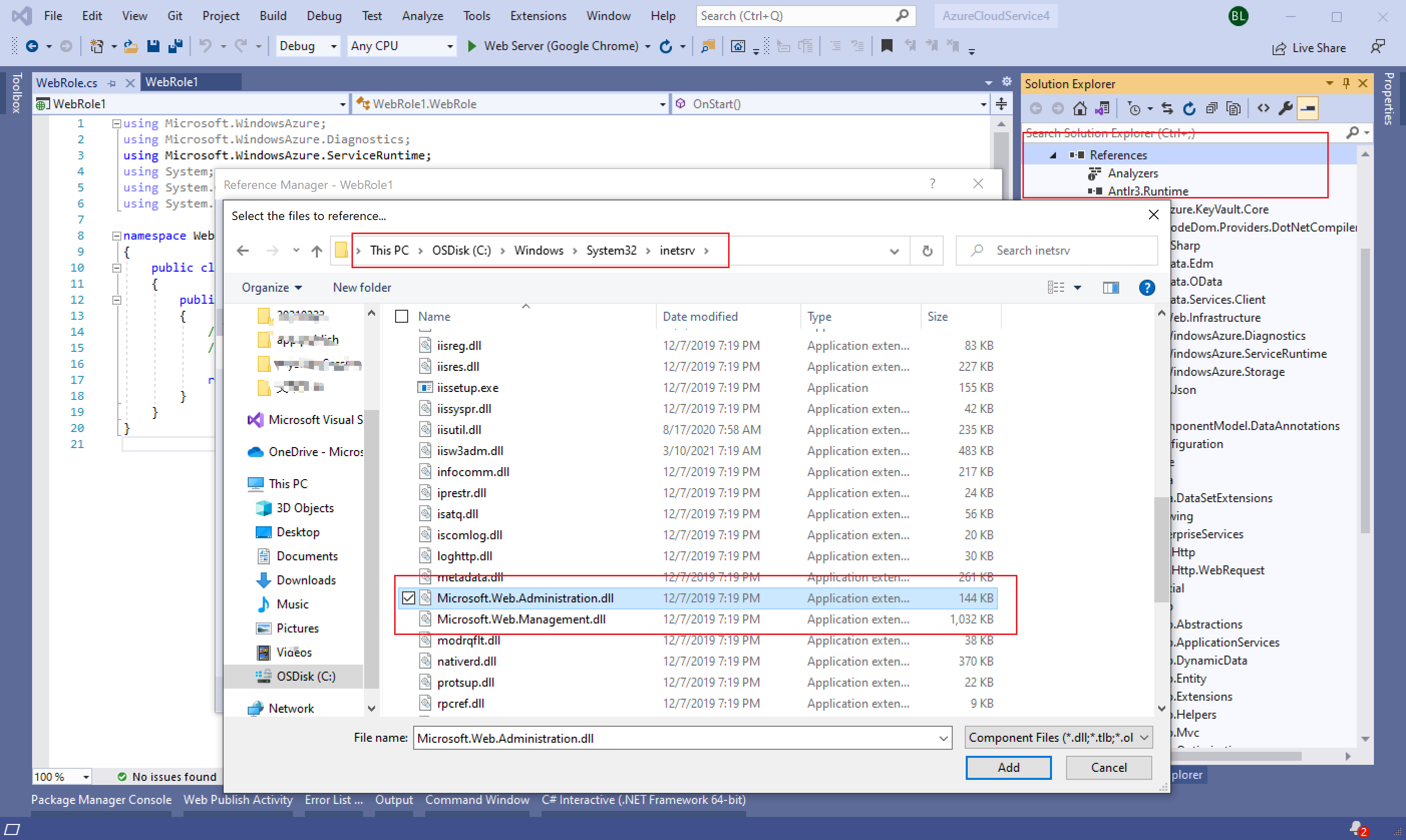
**第一步:**在WebRole.cs文件 OnStart()方法中加入对Servicer Manager的修改代码。在使用时候,需要引用Microsoft.Web.Administration.dll。文件路径为:C:\Windows\System32\inetsrv\Microsoft.Web.Administration.dll
**第二步:**修改IIS Application Pool
preloadEnabled:设置为ture,当Application Pool启动时,会自动想站点发送一个假请求。使得W3WP.EXE进程启动,当真实的第一个请求进入时马上进入业务处理,而避免为启动站点而消耗的时间。它与startMode="AlwaysRunning"配合
startMode:设置为AlwaysRunning
IdleTimeout:设置为0,表示没有闲置时间,W3WP.EXE进程不会自动终止
PeriodicRestart Time:设置为0,表示Applicaiton Pool不进行回收。
periodicRestart schedule:设置为05:00:00, 表示每天早上5点计划重启Application Pool。
        public override bool OnStart()
        {
            ServicePointManager.DefaultConnectionLimit = 12;
            if (!RoleEnvironment.IsEmulated)
            {
                using (ServerManager serverManager = new ServerManager())
                {
                    // 1.参照https://stackoverflow.com/questions/24676194/azure-web-role-warm-up-strategies
                    foreach (var app in serverManager.Sites.SelectMany(x => x.Applications))
                    {
                        app["preloadEnabled"] = true;
                    }
                    foreach (var appPool in serverManager.ApplicationPools)
                    {
                        appPool.AutoStart = true;
                        appPool["startMode"] = "AlwaysRunning";
                        appPool.ProcessModel.IdleTimeout = TimeSpan.Zero;
                        appPool.Recycling.PeriodicRestart.Time = TimeSpan.Zero;

                        //// 2.参照https://docs.microsoft.com/en-us/iis/configuration/system.applicationhost/applicationpools/add/recycling/periodicrestart/
                        //// < recycling logEventOnRecycle = "Schedule" >
                        ////  < periodicRestart >
                        ////   < schedule >
                        ////     < add value = "03:00:00" />
                        ////   </ schedule >
                        ////  </ periodicRestart >
                        //// </ recycling >
                        ConfigurationElement periodicRestartElement = appPool.Recycling.GetChildElement("periodicRestart");
                        ConfigurationElementCollection scheduleCollection = periodicRestartElement.GetCollection("schedule");
                        ConfigurationElement addElement1 = scheduleCollection.CreateElement("add");
                        addElement1["value"] = TimeSpan.Parse("05:00:00");
                        scheduleCollection.Add(addElement1);
                    }
                    serverManager.CommitChanges();
                }
            }
            // For information on handling configuration changes
            // see the MSDN topic at https://go.microsoft.com/fwlink/?LinkId=166357.
            return base.OnStart();
        }
**第三步:**提交修改 ( serverManager.CommitChanges();)
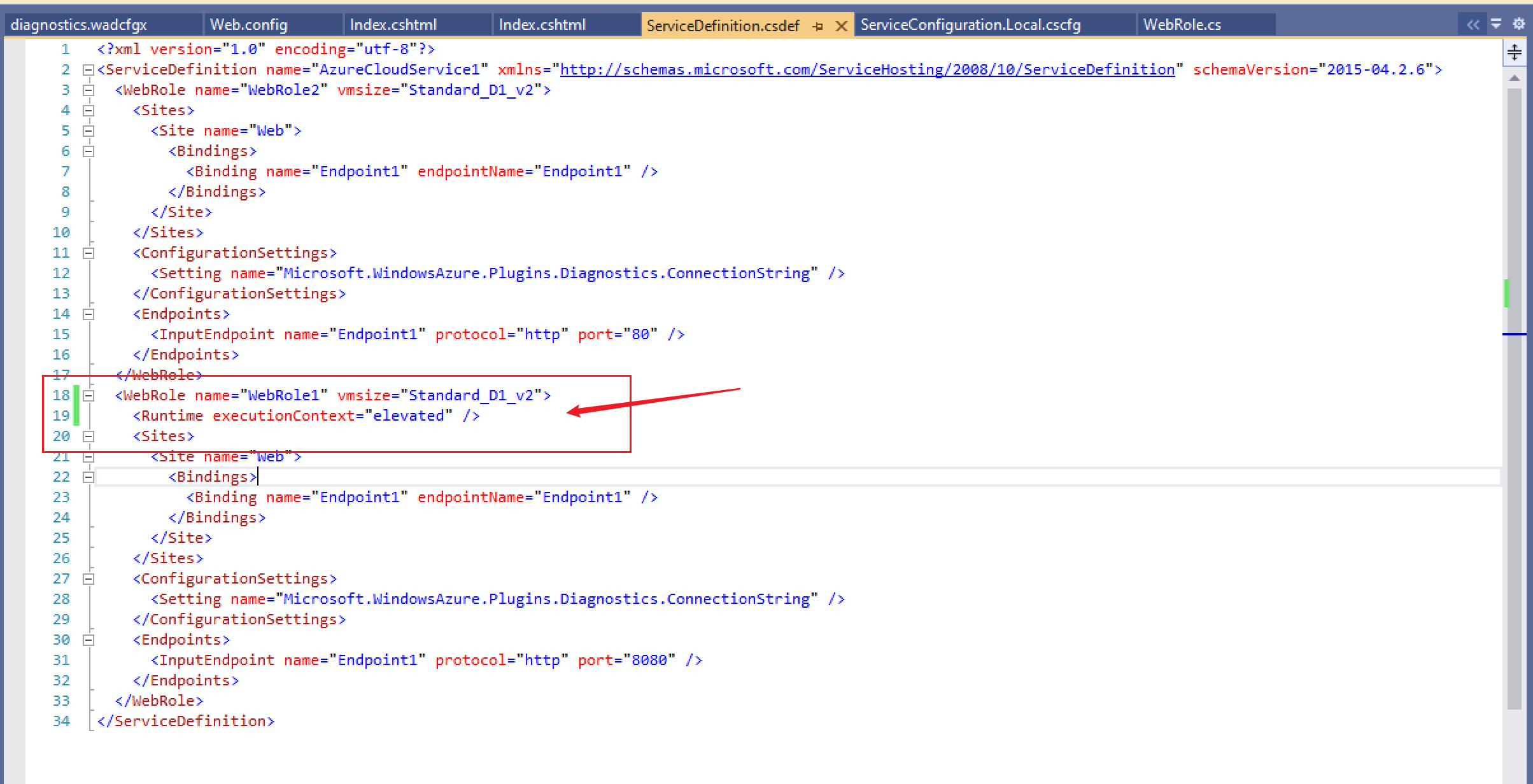
**第四步:**在部署的时候,由于修改IIS配置需要提升权限,所以在发布时候需要在WebRole的配置文件(ServiceDefinition.csdef)中设置 <Runtime executionContext="elevated" />
发布后RDP到示例中验证
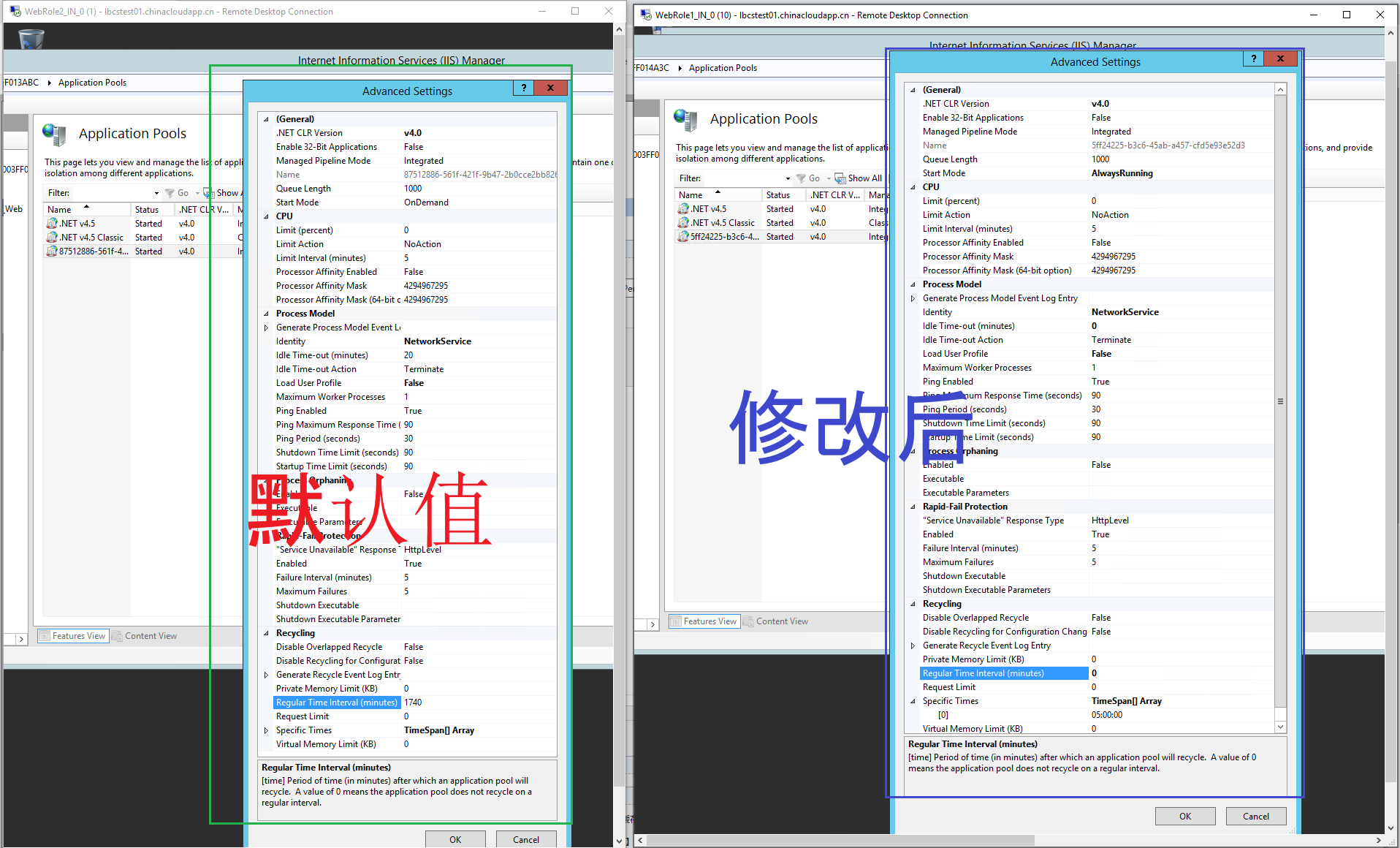
附录一:使用启动任务方式修改IIS配置
Follow the simple steps to gain granular control over Web Role process.
-
Create
Startup.cmdto the project root folder referenced by your web role project.-
Change content properties to
Copy if newerfor**Startup.cmd**-
Add following code to **
Startup.cmd**- as needed.Disable idle
<code class=" language-powershell">  %windir%\system32\inetsrv\appcmd set config -section:applicationPools -applicationPoolDefaults.processModel.idleTimeout:00:00:00
</code>
Auto start
<code class="language-powershell">  %windir%\system32\inetsrv\appcmd set config -section:applicationPools -applicationPoolDefaults.autoStart:true
</code>
Always running
<code class="language-powershell">  %windir%\system32\inetsrv\appcmd set config -section:applicationPools -applicationPoolDefaults.startMode:AlwaysRunning
</code>
Disable recycling
<code class="language-powershell">  %windir%\system32\inetsrv\appcmd set config -section:applicationPools -applicationPoolDefaults.recycling.periodicRestart.time:00:00:00
</code>
Save the file as UTF-8 without a signature. (Tip: File Menu > Advanced Save Options in Visual Studio.)
-
Test the same in
Azure Emulator Express- making sure that the code is not breaking anything.-
Modify**
ServiceDefinition.csdef**to add the task andelevatedattribute.<code class="language-xml"><ServiceDefinition name="NilayCornerService" xmlns="[http://schemas.microsoft.com/ServiceHosting/2008/10/ServiceDefinition](http://schemas.microsoft.com/ServiceHosting/2008/10/ServiceDefinition)"> <WorkerRole name="NilayCornerWorkerRole1"> ... <Startup> **<Task commandLine="Startup.cmd" executionContext="elevated" taskType="simple" />** </Startup> </WorkerRole> </ServiceDefinition> </code>Tip for advanced usage
To see a list of available options per section, try the following command
<code class="language-powershell">%windir%\system32\inetsrv\appcmd set config -section:applicationPools -?</code>
附录二:部署时遇见的错误
| Unhandled Exception: Filename: Error: Unrecognized element 'recycling' at Microsoft.Web.Administration.Interop.IAppHostElement.GetElementByName(String bstrSubName) at Microsoft.Web.Administration.ConfigurationElement.GetChildElement(String elementName) at WebRole1.WebRole.OnStart() in C:\Users\bulu\source\repos\AzureCloudService3\WebRole1\WebRole.cs:line 43 at Microsoft.WindowsAzure.ServiceRuntime.RoleEnvironment.InitializeRoleInternal(RoleType roleTypeEnum) at Microsoft.WindowsAzure.ServiceRuntime.Implementation.Loader.RoleRuntimeBridge.<InitializeRole>b__0() at System.Threading.ExecutionContext.RunInternal(ExecutionContext executionContext, ContextCallback callback, Object state, Boolean preserveSyncCtx) at System.Threading.ExecutionContext.Run(ExecutionContext executionContext, ContextCallback callback, Object state, Boolean preserveSyncCtx) at System.Threading.ExecutionContext.Run(ExecutionContext executionContext, ContextCallback callback, Object state) at System.Threading.ThreadHelper.ThreadStart() ' [2021-03-25T08:47:15Z] Last exit time: [2021/03/25, 08:47:15.149]. Last exit code: 0. |
|---|
| 代码中出现重复获取Recycling节点 ConfigurationElement periodicRestartElement = appPool.Recycling.GetChildElement("recycling").GetChildElement("periodicRestart"); 修改为 ConfigurationElement periodicRestartElement = appPool.Recycling.GetChildElement("periodicRestart"); |
| 修改后,问题消失。 |
参考资料
IIS: Idle Timeout vs Recycle:https://stackoverflow.com/questions/19985710/iis-idle-timeout-vs-recycle
Azure Web Role “warm up” strategies [closed]:https://stackoverflow.com/questions/24676194/azure-web-role-warm-up-strategies
Periodic Restart Settings for Application Pool Recycling <periodicRestart>:https://docs.microsoft.com/en-us/iis/configuration/system.applicationhost/applicationpools/add/recycling/periodicrestart/
Azure 云服务(经典)和 ASP.NET 入门:https://docs.azure.cn/zh-cn/cloud-services/cloud-services-dotnet-get-started
正在加载评论...